


Meta description: Best access control system for office buyers guide with practical advice on software, door hardware integration, compliance, and long-term reliability.
If you're dealing with lost keys, employee turnover, after-hours access requests, and doors that never seem to behave the same way twice, you're already in the market for the best access control system for office use, even if you haven't written the project brief yet.
Most buyers start by comparing apps, credentials, and dashboards. That matters, but it isn't enough. The system has to work with the actual opening. That means the lock, closer, automatic operator, door frame, fire alarm interface, and in some buildings, even the dock or secure vestibule. A slick platform on the wrong door is still the wrong solution.
This guide looks at access control the way facility teams have to live with it: as a long-term building system, not just an IT purchase. You'll see how to compare cloud, on-premise, and hybrid models, which features improve office operations, where physical door integration gets missed, and how to choose a partner that can keep the whole system reliable.
Choosing Your Next Office Access Control System
A common office problem looks simple on paper. A few keys are floating around. A former employee may still have one. The receptionist is managing visitor access manually. Someone wants the side entrance open for deliveries, but only during a certain window. Then a tenant asks for mobile credentials, and the building still runs on a patchwork of cards, keys, and standalone locks.
That's where an access control system earns its place. In simple terms, it's the combination of software, controllers, readers, credentials, and door hardware that decides who can enter, where they can go, and when that access should work. If you need a basic primer before comparing platforms, Wilcox has a clear overview of what an access control system is.
What buyers usually need to solve
Most office projects come down to a short list of operational problems:
- Key replacement risk: Physical keys are hard to track, easy to copy, and slow to revoke.
- Staff changes: HR and facility teams need a faster way to add, change, or remove access.
- Multi-door inconsistency: Main entrances, server rooms, shared amenity spaces, and after-hours doors often need different rules.
- Remote oversight: Property managers want to manage access without travelling to each site.
- Building integration: The chosen software still has to work with the doors already installed.
Canadian market guidance increasingly points office buyers toward cloud-managed systems for multi-door and multi-site environments because they simplify central administration and reduce on-site server maintenance, especially across entrances, elevators, and dispersed locations, as noted in Acre Security's review of best cloud-based access control systems.
A broader industry view can also help when you're shortlisting options. For a practical external read focused on office environments, ABCO Security Australia on office access gives a useful comparison of common setups and operational needs.
Practical rule: Buy for the way your building runs on a normal Tuesday, not for the demo that looks good in a boardroom.
Early comparison snapshot
| System type | Best fit | Main advantage | Common drawback |
|---|---|---|---|
| Cloud-based | Multi-site offices, property portfolios, coworking, distributed teams | Remote management and less local IT overhead | Ongoing subscription and reliance on connectivity |
| On-premise | Single sites with internal IT and tighter control requirements | Local control and deep internal governance | More maintenance responsibility on site |
| Hybrid | Buildings with legacy systems or phased upgrades | Keeps existing infrastructure in play while modernising management | More design complexity |
| Standalone smart locks | Small, simple office areas | Quick deployment on limited openings | Weak fit for enterprise rules and broad integration |
Understanding the Core System Architectures
The easiest way to understand access control architecture is to compare it to file storage.
An on-premise system is like keeping your files on a local office server. A cloud-based system is like using an online platform managed through the internet. A hybrid system keeps some parts local while moving management and visibility into the cloud.
That difference affects more than IT. It changes how your team handles updates, credentials, remote support, and future expansion.
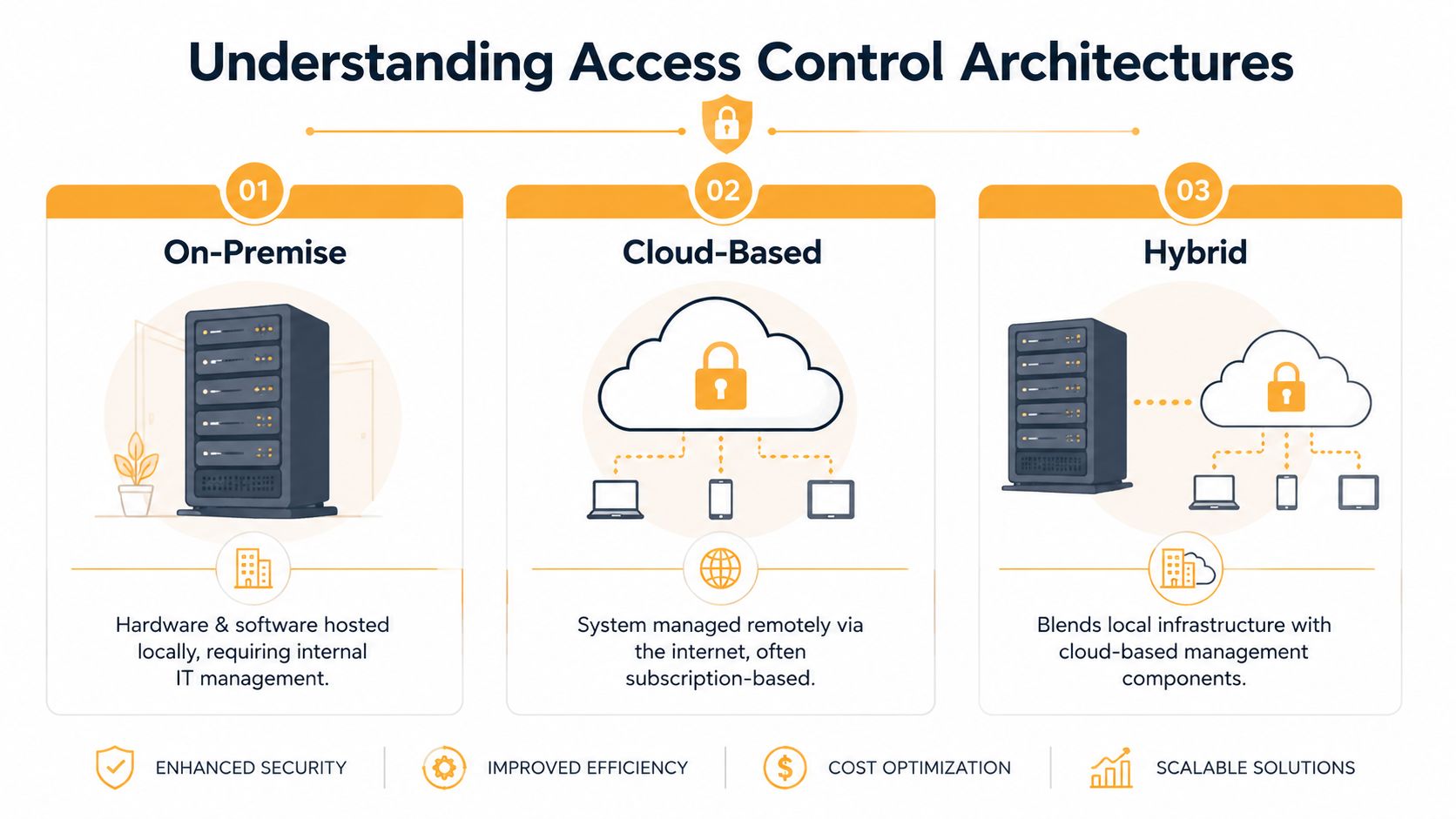
Cloud-based systems
For many office environments, cloud is the practical default. Canadian-focused guidance notes that cloud-based access control is a strong fit when remote administration across multiple sites matters, especially because it removes on-site server dependency, supports automatic software updates, and helps property managers standardise workflows across dispersed buildings, according to Vizdom's overview of best access control systems for offices.
In day-to-day terms, that means your team can:
- Add users remotely: No trip to the site just to issue or revoke access.
- Change schedules quickly: Useful for holidays, tenant requests, and temporary contractors.
- Scale more cleanly: New doors and locations are easier to fold into one management process.
- Reduce server upkeep: Less patching and fewer local dependencies for internal IT.
Cloud works well for offices with multiple entry points, portfolios with more than one property, and organisations that don't want security software tied to a single building server.
On-premise systems
On-premise still has a place. Some organisations want their access control environment hosted locally because they have strict internal governance, specialised integration needs, or dedicated IT teams already supporting security systems.
This model can make sense when:
- The site is highly controlled: Head offices, regulated facilities, or spaces with specific internal security requirements.
- Internal IT prefers local oversight: The organisation already manages similar systems on site.
- Integration is highly custom: Legacy video, alarms, or identity infrastructure may already be tied into local systems.
The trade-off is responsibility. Local hosting can increase maintenance effort, and future upgrades often require more planning than a cloud-first deployment.
A good architecture isn't the one with the longest feature list. It's the one your team can support without creating workarounds.
Hybrid systems
Hybrid is often the most realistic path in existing office buildings. Acre Security's 2026 comparison describes Genetec Synergis as a “hybrid-cloud solution” designed for complex infrastructure and legacy transitions in environments where organisations need to modernise without discarding everything already installed, as discussed in Acre Security's comparison of cloud-based access control systems.
Hybrid becomes useful when a building already has:
- legacy controllers or panels that still function
- integrated CCTV or alarm infrastructure that can't be ripped out overnight
- ownership pressure to modernise gradually rather than fund a full replacement
Quick architecture decision guide
| If your office needs… | Usually the better fit |
|---|---|
| One dashboard across several buildings | Cloud-based |
| Local hosting under internal IT control | On-premise |
| A phased upgrade from older infrastructure | Hybrid |
| Minimal complexity for a few simple openings | Standalone or small-scale cloud |
The mistake to avoid is choosing architecture based only on software preference. The better approach is to match the architecture to your building portfolio, support model, and existing hardware reality.
Key Features to Compare for Modern Offices
Once the architecture is clear, feature comparison gets easier. At this stage, many buyers overfocus on credentials and underweight operational control.
The better question isn't “does it support mobile entry?” It's “does it help the office run with fewer exceptions, fewer manual steps, and clearer accountability?”
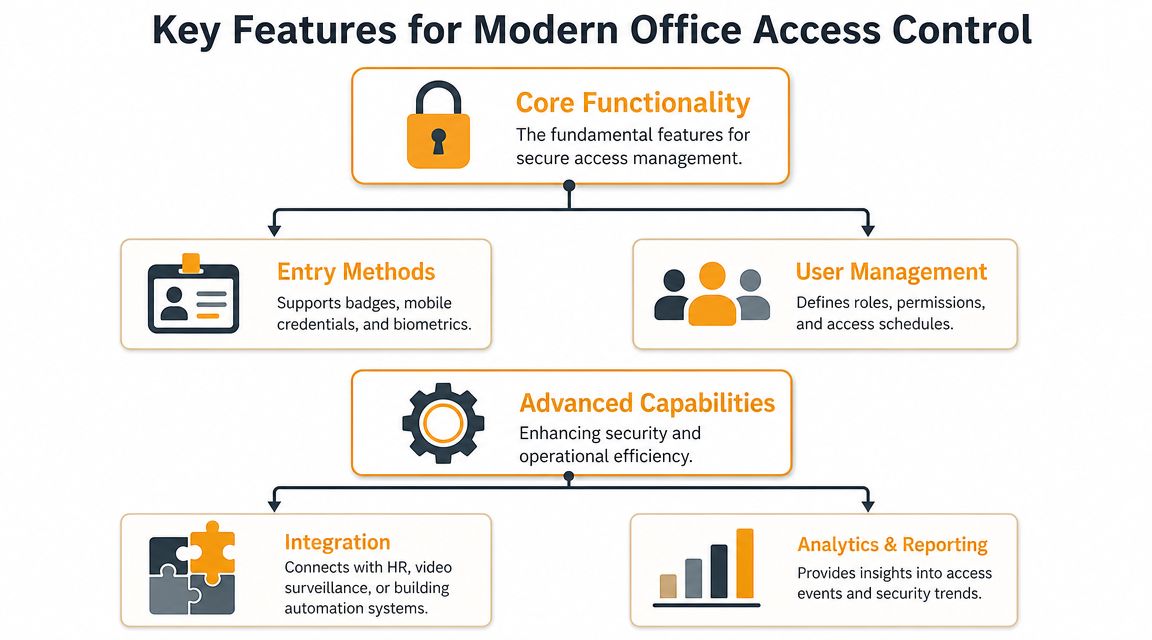
Credentials and user experience
Most office systems now support a mix of credentials such as cards, fobs, PINs, and smartphone-based access. Mobile credentials are appealing because they reduce physical badge handling and can be easier to issue or revoke. Cards and fobs still make sense in many offices because they're familiar, durable, and straightforward for visitors or contractors.
Biometric options may fit certain restricted areas, but they often create added complexity around privacy, policy, and user acceptance. For a normal office deployment, convenience and reliability usually matter more than novelty.
Operational features that matter
For high-traffic office buildings, industry roundups now judge systems by how well they manage large user counts and many doors while tying access into wider identity and building workflows. Recent comparisons highlight platforms such as Brivo for spaces with lots of users and doors and note the category's shift from simple entry functions to broader identity governance, analytics, and automation in office settings, as described in Archie's review of best access control systems.
That evolution changes what you should compare:
- Role-based permissions: Finance, HR, IT, executive suites, and shared amenity areas usually need different rules.
- Schedules and time zones: Access by shift, tenancy, cleaner schedule, or holiday period reduces manual intervention.
- Remote lock and entry control: Helpful for deliveries, contractors, and reception overflow.
- Audit trails: Useful when investigating access events or proving that policies were applied.
- Visitor workflows: Temporary credentials and controlled entry improve both security and front-desk efficiency.
- Software integrations: HR, calendars, video, and automation links can remove duplicate data entry.
What works well in practice
Three feature groups usually deliver the most value.
| Feature group | Why it matters in an office | What to watch for |
|---|---|---|
| Credential flexibility | Supports employees, visitors, contractors, and shared users | Too many credential types can confuse support |
| Admin controls | Lets teams manage schedules, roles, and events quickly | Clunky interfaces create workarounds |
| Integrations | Connects access activity to video, HR, and building systems | Integration claims need verification at the door level |
Field note: The best admin dashboard still fails if reception has to prop the door open because visitor access is too slow.
Security also shouldn't be treated as one layer. Access control, cameras, alarms, identity policies, and network hygiene all have to support each other. If your internal stakeholders need a plain-language explanation of that layered model, IT Cloud Global on cyber threats is a useful companion read.
Features that often disappoint
Some functions look impressive in demos but underdeliver on site:
- App-heavy experiences without backup credentials: Phones die. Visitors forget instructions.
- Complex analytics no one uses: Logs matter. Fancy dashboards matter less if no one reviews them.
- Proprietary lock choices without service planning: A smooth software interface doesn't offset hard-to-source hardware.
- Too much automation too early: If your permissions model is still unclear, automation can spread mistakes faster.
A solid office platform should reduce friction, not create another admin system that only one person understands.
Integrating Access Control with Facility Hardware
Many access control projects derail at this stage.
A software platform may be excellent, but the opening still has to latch properly, release correctly, close safely, and comply with fire and accessibility requirements. In Canadian facilities, that physical integration is a critical concern. Coram's industry roundup notes that many “best access control” articles overlook the need to coordinate with electrified hardware, automatic door openers, and fire or life-safety equipment, especially in mixed-use buildings with varied door types, as discussed in Coram's article on top access control systems.
The door decides what's possible
An office entrance might look like one scope item on a drawing. In practice, it can involve:
- Electrified strikes: These release the latch when the system grants access. They're common where free egress is needed and the existing lockset can remain.
- Magnetic locks: These hold the door closed with magnetic force and need proper release logic, emergency egress planning, and code-aware installation. If you're comparing this hardware type, Wilcox provides a practical overview of the door magnetic lock and where it fits.
- Electric latch retraction or electrified locksets: Useful where panic hardware or higher-traffic entries are involved.
- Automatic operators: Important at accessible entrances where the access event may also need to trigger assisted opening.
- Door position switches and request-to-exit devices: These support monitoring, safe egress, and reliable event logic.
If those parts aren't selected together, the result is usually a door that chatters, misaligns, holds open badly, or generates nuisance alarms.
Office examples that expose weak design
A few common scenarios show why physical coordination matters.
A glass aluminium storefront entrance may not have the frame depth or hardware prep for the lock method proposed by the software vendor. A rear staff door might need a different hardware set because it sees carts, deliveries, and heavy traffic. A shared office in a mixed-use building may need the access system to release properly during a fire alarm while still protecting a tenant-only corridor.
Then there are hybrid office and light industrial sites. The office credential may control the front pedestrian entry, while adjacent warehouse staff use separate doors, grilles, or secure internal zones. One system can manage all that, but only if the hardware plan reflects the actual use of each opening.
Hardware compatibility isn't a footnote. It's the difference between a reliable opening and a recurring service call.
What to confirm before approval
Before signing off on a proposal, ask these questions:
- What lock hardware is being used on each opening, and why?
- How does the system handle fire alarm release and emergency egress?
- Will accessible doors trigger correctly with operators and sensors?
- Can the opening be serviced locally without replacing the whole system?
- Does the design preserve existing frames, wiring, or panels where practical?
The best access control system for office use has to be judged door by door, not just platform by platform. That's especially true in older buildings, retrofits, and mixed-use facilities where the physical opening is already telling you what the software must accommodate.
Analyzing Cost, Compliance, and Lifecycle
The first quote is rarely the actual cost.
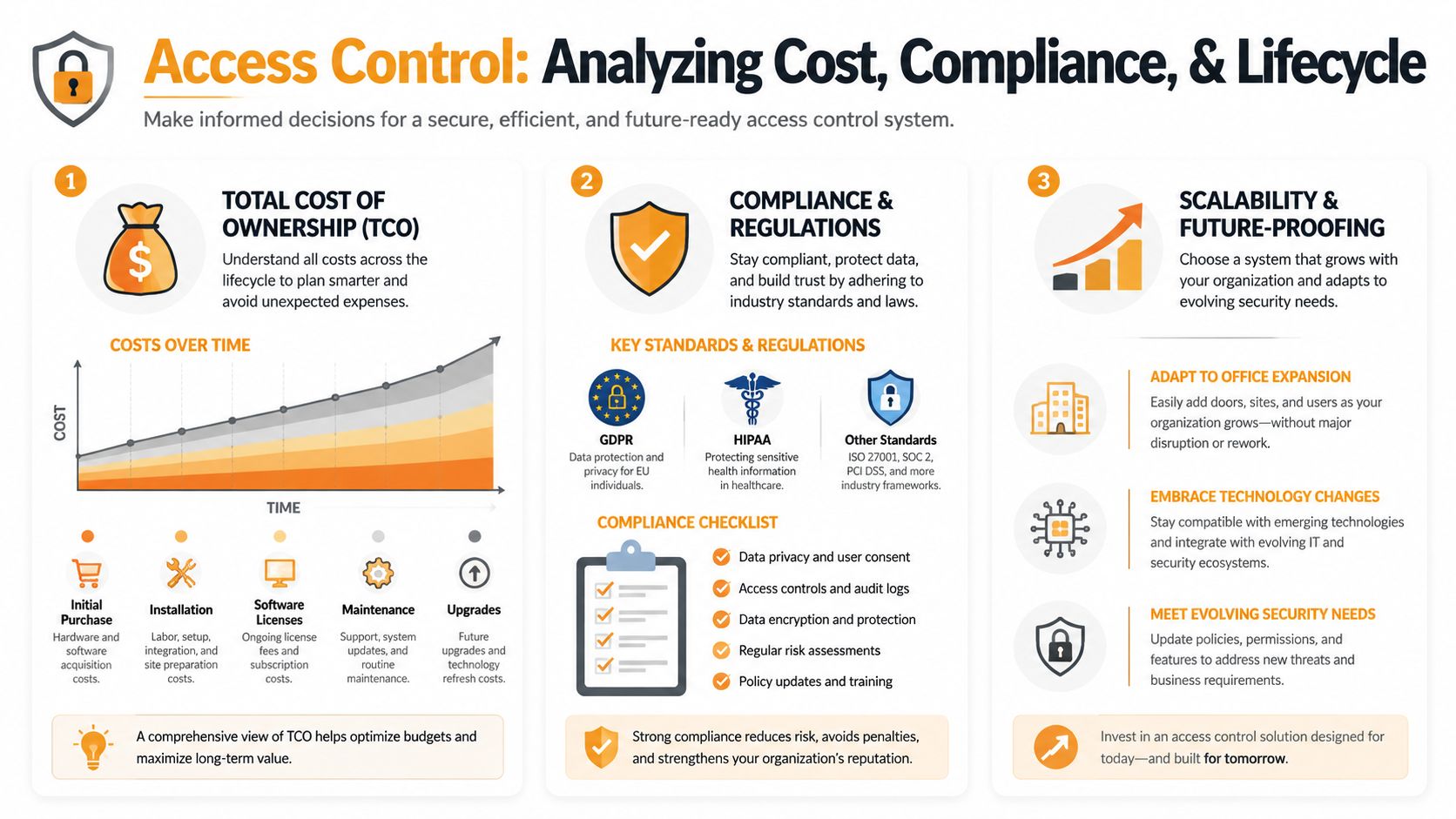
A proper buying decision needs a total cost of ownership view that includes hardware, software, installation, support, maintenance, and the cost of future changes. That matters because a system that looks inexpensive at procurement can become awkward and expensive once the office expands, tenants change, or doors need repeated adjustment.
What belongs in total cost of ownership
Break the budget into three buckets.
| Cost area | What it includes | Why buyers miss it |
|---|---|---|
| Initial capital | Readers, controllers, power supplies, wiring, locks, door work, programming | Software demos can hide physical opening costs |
| Recurring operating cost | Licences, subscriptions, support, credential management | Monthly costs look small until multiplied across doors and sites |
| Lifecycle cost | Adjustments, replacement parts, retrofits, expansion, service calls, upgrades | These show up after handover, not during procurement |
Cloud systems can improve the operating picture for some portfolios. A key benefit is lower local IT maintenance because there's no on-premise server dependency and software updates are automatic, which is particularly relevant for Canadian property managers standardising workflows across multiple sites, according to Vizdom's guidance on office access control systems.
That doesn't mean cloud is always cheaper. It means some costs move from local infrastructure to subscription and service planning.
Compliance isn't separate from cost
Office buyers often treat compliance as a final checklist item. It should be part of early budgeting.
A compliant system may require:
- Accessible operation: The opening has to work for users who need assisted entry.
- Fire and life-safety coordination: Access-controlled doors must release and egress properly under alarm conditions where required.
- Auditability: Logs and permissions should support internal reviews and incident response.
- Data handling discipline: Credential and user data need sensible governance.
If the access control scope ignores these items at tender stage, they tend to return later as change orders, delays, or operating problems.
The lifecycle questions that save trouble
Use these during evaluation:
- How easy is it to add a door or a new office suite later?
- Can the system support both office entries and specialty openings if the facility changes?
- Who services the electrified hardware after installation?
- What happens if a controller, reader, or power supply fails?
- Will software updates affect integrations already in use?
Buy the system you can maintain for years, not the one that looks cheapest before the first tenant change.
A sustainable access control investment balances software flexibility with hardware serviceability. If either side is weak, lifecycle cost usually climbs.
How to Choose the Right Implementation Partner
The longer you own the system, the less the logo on the dashboard matters and the more the implementation partner matters.
That's because office access control doesn't live in a vacuum. Someone has to coordinate low-voltage work, door hardware, code requirements, end-user permissions, and service support after occupancy. In enterprise office environments in Canada, the better outcome often depends on the installer's ability to unify access events with video and alarms while preserving existing infrastructure. Acre Security's market comparison makes that clear in its discussion of cloud-based access control systems.
What a reliable partner should handle
A qualified partner should be able to do more than install readers.
Look for a team that can:
- Assess the opening itself: Not just the software, but the frame, lock prep, power, closer, operator, and life-safety impact.
- Work with existing infrastructure: Especially in retrofits where rip-and-replace isn't the right answer.
- Coordinate other systems: Access events often need to align with cameras, alarms, intercoms, and door operators.
- Provide service after turnover: Hardware drifts, doors settle, users change, and policies evolve.
- Support practical testing: Access granted, access denied, forced-open, held-open, fire release, and egress should all be verified.
If you're vetting installation options, Wilcox offers access control system installation for commercial facilities alongside related door and opening integration work.
Questions worth asking before award
Don't keep the interview too general. Ask direct questions.
- Who will service the doors and electrified hardware after the system goes live?
- What happens when software and physical hardware point fingers at each other?
- Can the installer support legacy infrastructure during a phased transition?
- How are emergency calls handled outside business hours?
- What testing is included at handover?
A useful parallel from the cyber side is the value of independent validation. If your organisation already uses managed IT or security providers, it may help to learn about MSP Pentesting solutions as an example of how specialist partners strengthen overall security assurance instead of assuming one vendor covers every risk.
The partnership test
A strong implementation partner speaks plainly about trade-offs.
They'll tell you when a certain lock type is wrong for a door. They'll push back on a reader location that creates accessibility issues. They'll explain whether a legacy panel should stay, be bridged, or be replaced. They'll also recognise that loading docks, staff entrances, vestibules, and office suites don't all behave the same way.
That's the difference between a purchase and a working system. For long-term reliability, the best access control system for office use is the one installed, tested, and supported by people who understand the entire opening.
If you're planning an upgrade, retrofit, or new office deployment, Wilcox Door Service Inc. can help you assess the full opening, from software and credentials to locks, operators, and life-safety coordination. It's a practical next step for teams that want Respected Partners, Reliable Service.