


A facility manager usually knows the pain points before anyone else does. A contractor calls because their key no longer works at the side entrance. A supervisor needs after-hours access for a temporary crew. Someone loses a fob, and now you have to decide whether the risk is acceptable or whether the lock schedule needs to change. Meanwhile, the loading dock still has to move freight, the warehouse still has to stay secure, and nobody wants another paper logbook sitting on a desk with half the names unreadable.
That's where an access control system RFID setup starts to make practical sense. It replaces loose key control with managed credentials, recorded activity, and access rules you can change without changing hardware at every opening. In a commercial facility, that matters far beyond the front door. It affects overhead doors, pedestrian entrances, loading dock traffic, restricted storage rooms, and how quickly you can respond when staffing changes.
In Canadian facilities, RFID access control has matured from simple badge entry to centrally managed platforms with readers, door controllers, servers, and audit logs, which support real-time credential revocation and central permission management across distributed sites, as outlined in this RFID access control overview. For facility teams, its primary value is operational. You get better control over who enters, when they enter, and what happens when a credential should no longer work.
Introduction The End of Lost Keys and Logbooks
At most sites, the access problem doesn't start as a security project. It starts as an operations problem.
A warehouse lead props open a door because drivers are moving constantly. A contractor borrows a badge from someone on the maintenance team because nobody wants to wait for authorisation. A lost key turns into a meeting about liability, but the main frustration is the wasted time. Traditional lock-and-key systems push these problems back onto staff, and staff solve them with workarounds.
Those workarounds are where risk grows. You lose visibility. You lose accountability. You also lose efficiency, because every change in staffing, shift coverage, or vendor access becomes a manual task.
Practical rule: If access depends on memory, handwritten notes, or a key cabinet, it won't stay controlled for long.
An RFID access control system fixes that by making access digital, immediate, and traceable. Instead of asking, “Who has the key?” you ask, “Who should have access right now?” That's a much better question for a modern facility.
What facility managers usually want
Many organizations aren't asking for fancy technology. They want a system that does four things well:
- Stops key sprawl: You don't have to chase physical keys across shifts, contractors, and departments.
- Handles change quickly: Lost card, terminated employee, temporary cleaner, weekend vendor. Access can be updated without rekeying doors.
- Supports compliance: You need records for incident review, internal controls, or restricted-area access.
- Works with the building: Door hardware, electrified locks, dock equipment, and operators all need to function together reliably.
In commercial and industrial settings, that last point matters more than many vendors admit. A reader on the wall is only one part of the job. The critical test is whether the entire opening performs properly under daily use.
Where this gets interesting in real facilities
RFID isn't only about letting people into an office corridor. It can tie into high-speed doors, parking and gate access, secured interior zones, and dock workflows where access and equipment status need to align. That's where the conversation shifts from “security upgrade” to “site performance upgrade.”
What Is an RFID Access Control System
An RFID access control system is a keyless entry system that uses radio waves to identify a credential and decide whether to grant access. In plain language, it works like a digital gatekeeper with a very good memory. A card, fob, or other credential presents an identity. A reader captures it. The system checks whether that identity is allowed at that door, gate, or controlled point.
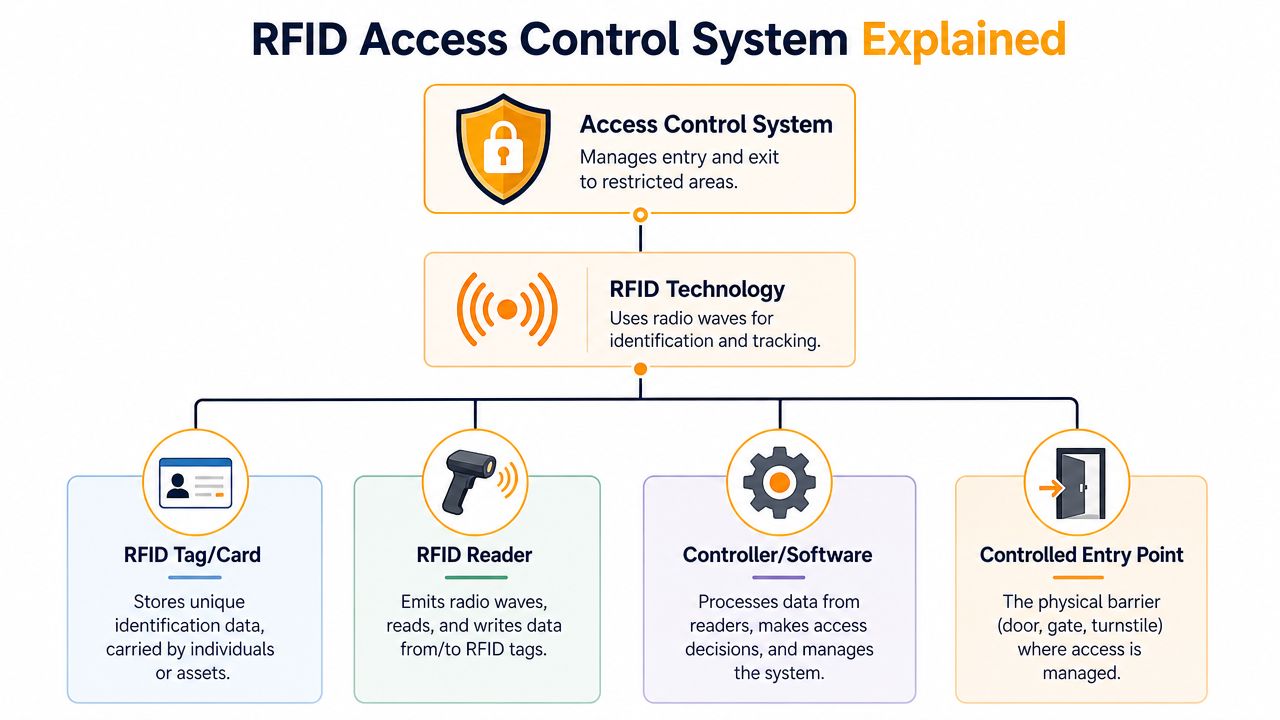
Unlike a mechanical key, an RFID credential isn't just a physical object. It's part of a managed system. That means permissions can be assigned by person, area, and schedule. If a card is lost, access can be removed in software instead of changing cylinders and issuing new keys.
What it does at the door
The process is straightforward:
- A person presents a card or fob to a reader.
- The reader sends that credential information to the controller.
- The system checks permissions.
- If the credential is valid, the door opens or the device activates.
- The event is recorded.
That last step is often the difference between old entry systems and modern ones. You're not just granting access to a door. You're creating an audit trail.
Why it's better than a standalone lock
A standalone lock can open or stay locked. An RFID platform can enforce rules.
It can allow a shipping manager into the warehouse at all times, limit a cleaner to evening hours, and deny a former contractor immediately. It can also support broader integrations. If you're reviewing options that connect physical security with broader building technology, this overview of smart business security integrations is a useful complement to the door-and-hardware side of planning.
For facilities that need stronger identity verification at selected openings, it also helps to compare RFID with other methods such as biometric access control systems.
The strongest RFID systems don't behave like digital keys. They behave like managed permission platforms.
What managers should keep in mind
Not every RFID setup is equal. Some systems are simple and local. Others are networked across buildings and regions. The right fit depends on whether you're controlling one staff entrance, a multi-tenant building, or a warehouse with doors, docks, and vehicle access all tied together.
The Four Core Components Explained
Most RFID systems look complicated until you break them into parts. In practice, there are four components that matter on almost every project.

Credentials
The credential is the thing the user carries. It might be a card, fob, windshield tag, or mobile credential depending on the application.
For everyday person-entry control, HF RFID at 13.56 MHz is the practical default because it gives tighter control with a typical read distance of about 30 cm (12 in), according to Atlas RFID Store's access control guide. That short range is useful at busy doors because it reduces accidental reads and makes the user interaction clear. Tap the credential. Wait for approval. Enter.
Older low-frequency credentials still exist in many buildings. They can work for basic proximity access, but they're often the first thing teams revisit when security requirements rise.
For gates, yards, or vehicle flow, the same source notes that UHF can read at 10+ metres. That makes it better suited to hands-free throughput than door-by-door staff entry.
Readers
The reader is mounted at the opening. It energises the credential, reads it, and passes the information into the system.
A good reader choice depends on the environment:
- Interior office doors: Smaller wall readers are usually enough.
- Exterior personnel doors: Weather exposure and durability matter more.
- Loading dock approaches: Reader placement must account for traffic flow, forklifts, and impact risk.
- Vehicle lanes: Long-range readers need clean line-of-sight planning.
If the read range is wrong for the opening, users get frustrated quickly. Too short at a gate, and traffic backs up. Too long at a pedestrian vestibule, and the system may pick up credentials you didn't intend to read.
Controllers
Controllers are the decision-makers. They receive the credential data and decide whether the door should permit entry, the magnetic lock should release, or the request should be denied.
The success or failure of many retrofit projects hinges on the following. A reader can be replaced easily. A controller upgrade needs proper review of wiring, lock hardware, door operators, fire and life safety requirements, and fail-safe versus fail-secure behaviour.
Field note: The door hardware still decides whether the opening performs reliably. The credential only starts the conversation.
Management software
The software is the command centre. It stores users, access levels, schedules, and event history.
This is the part that facility managers end up valuing most because it changes daily administration. You can issue credentials, remove them, create time windows for contractors, and review activity without touching the lock itself.
A simple comparison helps:
| Component | Job in the system | What can go wrong if it's poorly matched |
|---|---|---|
| Credential | Identifies the user or vehicle | Cloning risk, poor usability, wrong range |
| Reader | Captures the credential | Missed reads, nuisance reads, weather failure |
| Controller | Approves or denies entry | Unlock issues, poor integration with hardware |
| Software | Manages rules and records | Administrative delays, weak reporting, no visibility |
Integrating RFID with Doors and Dock Equipment
At 6:45 a.m., the outbound crew starts arriving, forklifts begin crossing between temperature-controlled zones, and the first trailer is backing into position. In that environment, RFID needs to do more than open a door. It has to work with operators, locks, sensors, and dock controls in a way that keeps traffic moving and keeps restricted areas controlled.
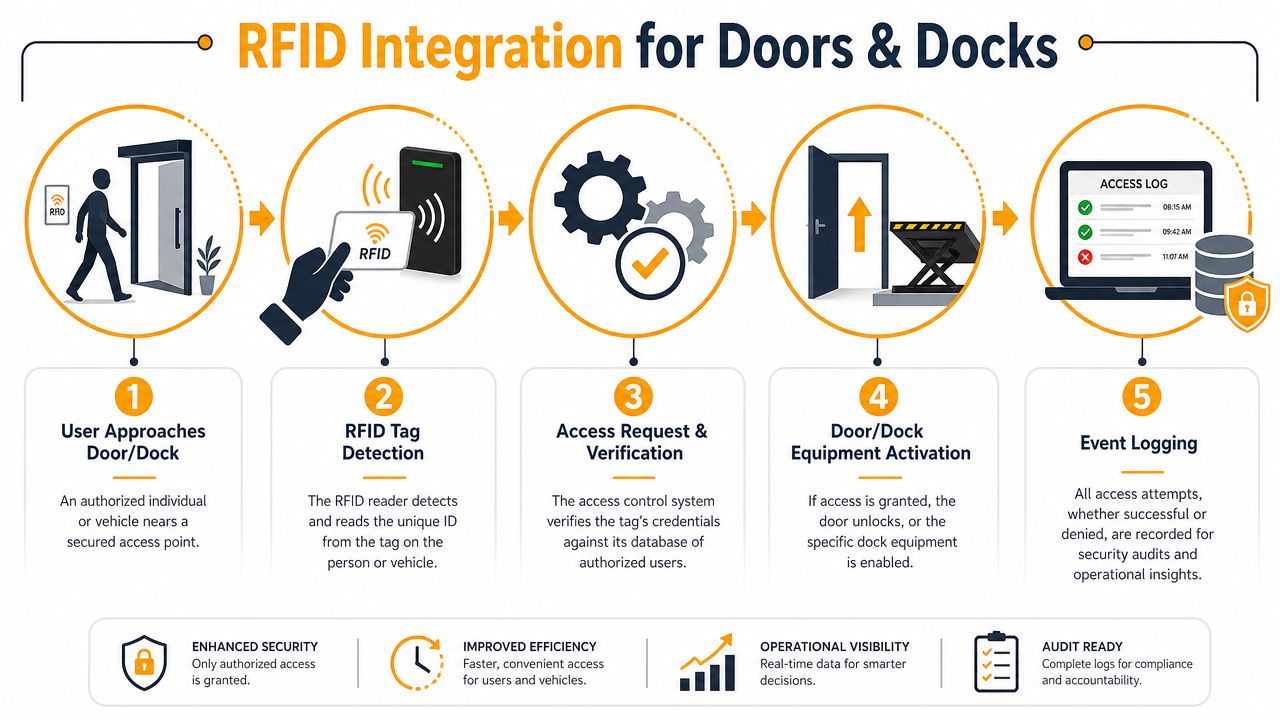
A badge reader on an office door is relatively simple. Warehouses and shipping facilities are different. The higher-value applications are usually tied to pedestrian doors at shipping offices, high-speed doors between conditioned and non-conditioned spaces, secure maintenance rooms, and loading dock positions where equipment status affects whether access should be granted.
A warehouse example that actually matters
A forklift operator approaches an interior high-speed door separating ambient warehouse space from a cooled pick area. The reader identifies an approved credential, but the opening should not cycle on credential data alone. Door position, traffic direction, safety devices, and operator timing all need to line up so the door opens when needed and closes promptly after passage. That reduces open time, which helps with temperature control, contamination separation, and wear on the door system.
At the dock, the logic often gets tighter. A supervisor may have permission to enter a controlled dock zone, but the next action can still depend on restraint status, interlocks, or monitored equipment conditions. In practice, that means RFID becomes part of a sequence. It is not a standalone device bolted onto the wall after the dock package is already chosen.
To see how the physical side of that plan comes together, it helps to review the role of commercial doors and loading dock equipment in facility access planning.
The basic user experience is simple. The integration work behind it is not.
Why central management changes the outcome
Central management matters most when a facility has multiple openings, multiple user groups, and changing schedules. A single credential database can control office entries, maintenance rooms, cage storage, and selected dock access points while keeping local hardware behavior matched to each opening.
That changes day-to-day operations in clear ways:
- Shift handoffs stay cleaner: teams do not need shared keys or posted PINs.
- Restricted spaces stay restricted: maintenance rooms, inventory cages, and electrical areas can follow job-based permissions.
- Dock activity becomes easier to review: event logs help supervisors verify who entered a controlled area and when.
- Multi-site administration takes less effort: access changes can be managed across facilities without rekeying doors.
The same principle applies outside the building. Credential rules increasingly need to line up with digital identity policies, especially for contractors, temporary users, and remote administration. Teams dealing with both physical and digital access can use concepts from practical IAM for cloud security to keep provisioning and revocation disciplined across systems.
For some pedestrian openings, the lock choice is part of the integration, not an afterthought. On the right application, mag locks for doors can be a fit, but only after reviewing egress, code requirements, door use, and hardware compatibility.
If the door, lock, operator, reader, and safety devices are specified separately, the site usually ends up with nuisance faults, slower traffic flow, and more service calls.
Where teams often make the wrong assumption
A common mistake is treating RFID as a reader project. In a busy warehouse or loading dock, it is an opening-system project. Reader location affects read accuracy. Traffic patterns affect whether people badge once or keep re-presenting credentials. Operator speed affects throughput. Interlocks and monitored equipment affect whether the sequence is safe and compliant.
This is why early coordination matters. The access decision may happen in software, but uptime depends on the physical opening doing the right thing every cycle. In my experience, facilities get better results when access planning starts with the actual use case at the door or dock, then works backward to credentials, controllers, and rules.
Security Compliance and Future Proofing Your System
Security problems often hide inside “working” systems. The door opens. Staff get in. Management assumes the setup is acceptable. Then a card is lost, a contractor keeps access longer than intended, or an old credential format proves easier to copy than expected.
That's why future-proofing matters. You're not only buying convenience. You're deciding how trustworthy the system will be over time.
Encrypted credentials matter
For higher-security deployments, encrypted HF smart cards such as MIFARE DESFire are the strongest option for most buildings because the reader verifies a credential against a database instead of relying on a visible card number alone, as noted in Swiftlane's RFID access control guidance. In practical terms, that improves revocation control, auditability, and resistance to cloning.
This is a major dividing line between older proximity systems and modern smart credentials. If your site still relies on legacy 125 kHz cards, the question isn't whether they function. The question is whether they still meet your risk profile.
Compliance is usually an audit-log problem
Most compliance-related access issues aren't dramatic break-ins. They're gaps in records.
You need to know:
- Who entered a restricted area
- When they entered
- Whether the credential was still authorised
- How temporary access was handled
- Whether access was removed promptly
Automatic expiration rules are especially useful for temporary staff, outside trades, and seasonal operations. They reduce the chance that someone keeps access because nobody remembered to remove it.
Restricted access without reliable logging creates a false sense of control.
Phased upgrades beat rip-and-replace projects
One of the most practical challenges in commercial facilities is moving from legacy 125 kHz proximity systems to more secure 13.56 MHz or mobile credentials without replacing every controller at once. Public guidance on this is often thin, but the issue is real for multi-site portfolios and public-sector buildings that need phased upgrades and careful budget control.
A sensible migration plan usually asks three questions first:
| Planning question | Why it matters |
|---|---|
| Which doors are highest risk? | Those openings often justify secure credentials first |
| What hardware can stay? | Readers, controllers, and locks may not need replacement at the same time |
| Can mixed credentials be supported during transition? | Phased rollout is easier when old and new formats can coexist temporarily |
This is also where physical and digital access planning start to overlap. If your team is also reviewing role-based permissions in software environments, this primer on practical IAM for cloud security gives useful context on how identity governance principles carry across systems.
What holds up over time
Future-proofing usually comes down to decisions made at specification:
- Choose secure credential types: Don't design a new system around outdated formats.
- Plan for mixed environments: Many facilities need interim compatibility during migration.
- Review controller capability: Some legacy infrastructure can stay in service during a staged upgrade.
- Build around lifecycle support: Readers fail, doors need adjustment, users change. The system has to be maintainable, not just installable.
Wilcox Door Service Inc. can be one option when a facility needs access control tied directly to commercial openings and door hardware, especially where access, uptime, and service support need to be considered together.
The ROI of RFID Benefits Beyond the Door
Most approval conversations start with price. The better conversation is about recurring friction.
If your team spends time replacing keys, chasing badges, managing shared access, investigating who entered a restricted area, or working around doors that don't fit the operation, the cost is already in the building. RFID doesn't remove every issue, but it does move access from a manual process to a controlled one.
The broader market reflects that shift. A global market report projected the RFID access-control system market at $11.4 billion in 2025 and $24.7 billion by 2034, with a projected 8.9% CAGR, while pointing to practical gains such as instant credential issuance or revocation and real-time event logging for audit and compliance in this market analysis. That's global, not Canada-only, but it matches what facility teams are already seeing on the ground. RFID is no longer treated as a niche convenience.
Where the return usually shows up
The value tends to appear in several places at once:
- Administrative time: Lost or stolen cards can be deactivated without changing locks.
- Traffic flow: Vehicle lanes and high-throughput openings move more cleanly when credentials fit the application.
- Energy control: Doors can open only when authorised and close promptly, which supports conditioned spaces.
- Operational uptime: Integrated systems reduce the need for ad hoc workarounds that create failures later.
- Incident review: Real-time access records make investigations faster and cleaner.
Security spend that helps operations
A facility manager can justify RFID more easily when the system improves daily workflow. That's especially true in warehouses and manufacturing sites, where doors aren't just barriers. They're part of production flow, sanitation separation, and shipping speed.
Good access control doesn't slow the building down. It removes the small delays and weak habits that slow it down every day.
There's also a budgeting advantage in avoiding unnecessary hardware replacement. When a site can phase upgrades, preserve parts of the existing infrastructure, and target the highest-risk openings first, the spend tends to align better with actual operational priorities.
Your Implementation Checklist and Next Steps
A good RFID rollout starts on the floor, at the doors, gates, and dock positions that affect daily throughput. Facilities get better results when they scope the project around traffic flow, security risk, and equipment condition, rather than starting with reader models or card types.
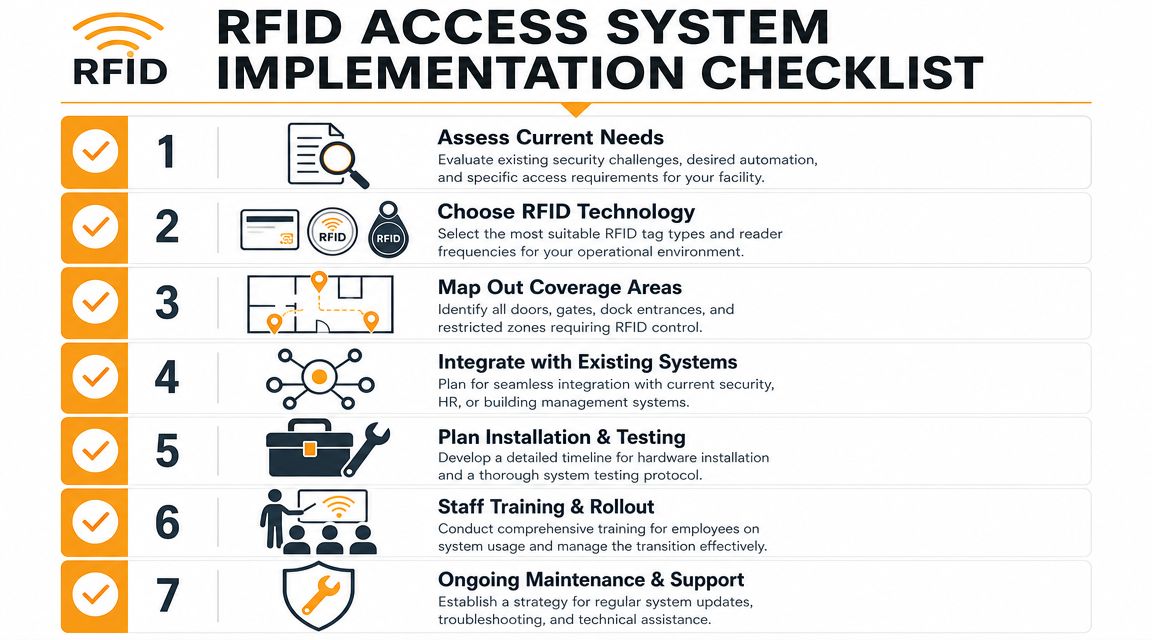
Seven checks worth doing before you buy
Audit every controlled opening
Include pedestrian doors, overhead doors, gates, server rooms, maintenance areas, and dock access points. Map the openings by how people, forklifts, and vehicles move through the site in practice. That usually exposes pressure points that never show up on a floor plan.Group users by role, not by habit
Set permissions for warehouse staff, supervisors, sanitation crews, contractors, carriers, and after-hours personnel. Shared credentials create audit gaps and make incident review harder.Match the credential type to the opening
Short-range tap credentials usually fit staff entrances and interior security doors. Longer-range readers or hands-free credentials make more sense at gates, yard entries, and openings used during busy dock cycles.Review what hardware can stay
Many facilities are working around older 125 kHz proximity hardware. Some sites can phase in higher-security credentials without replacing every panel or field device at once. That trade-off affects budget, cutover risk, and how quickly the site can improve security.Check integration points early
Readers do not operate in isolation. Door operators, electric strikes, maglocks, overhead doors, interlocks, dock restraints, and alarm inputs all need compatible control logic. At a loading dock, that coordination affects both security and uptime. It also helps reduce unnecessary door-open time, which matters in conditioned spaces.Plan service and testing, not just installation
Test the system during shift changes, delivery peaks, and emergency conditions. A reader that works at noon but creates delays during a morning truck rush is not ready for production use.Set a credential policy before rollout
Define how the site handles lost cards, temporary users, contractor expiry dates, role changes, and deactivated staff credentials. Clear rules keep administration clean and reduce workarounds at the door.
The most useful next move
Start with a site review. Walk the facility and identify which openings drive risk, which ones drive throughput, and which ones are tied to dock operations or temperature control. In practice, that often leads to a mixed plan. One entrance may need tighter credential control, a vehicle gate may need longer-read access, and a few overhead doors may benefit more from better integration than from new readers alone.
If your site is planning a retrofit or expansion, review your access control system installation requirements alongside the commercial doors and dock equipment already in place. That step helps avoid mismatched hardware, messy commissioning, and service issues later.
The right RFID project starts with traffic flow, risk zones, and hardware condition. Credential format comes after that.
If you're evaluating RFID access for a warehouse, dock, commercial building, or multi-site facility, Wilcox Door Service Inc. can help review the openings, hardware, and operating requirements before you commit to a retrofit or new installation. That is the standard we apply on real sites every day: Respected Partners, Reliable Service.