


If you're managing a warehouse, office tower, plant, or multi-tenant commercial site, you've probably dealt with the same access headaches over and over. Lost cards. Shared PINs. Former staff who still appear in old door groups. A loading dock side door that looks secure on paper but is hard to monitor in daily use. That's usually the point where people start looking at an access control system biometric option.
Biometric access control ties entry to a person's physical trait rather than something they carry. That can mean a fingerprint, face, iris, or palm pattern. For Canadian facility managers, the decision isn't only about stronger door security. It also affects privacy practices, consent, retention, policy design, and how your access system connects to real-world hardware like electric strikes, maglocks, overhead doors, and dock equipment.
Experienced planning is vital. In Canada, the question isn't only “Can this reader work?” It's also “Should this reader be used here, for this purpose, with this policy?” That distinction matters in day-to-day operations.
Moving Beyond Keys and Cards
A common starting point is simple frustration.
A property manager has one tenant reporting card sharing after hours. A plant supervisor needs tighter control at a tool crib and server room. A distribution centre keeps replacing damaged fobs because staff move between the office entrance, warehouse man door, and shipping area all day. None of these problems are dramatic on their own. Together, they create a steady drain on time, security confidence, and admin effort.
Traditional credentials still have their place, but they come with familiar weaknesses:
- Keys get copied or go missing: Once a mechanical key leaves your control, you can't audit where it went.
- Cards can be loaned out: The system may show a valid credential, but not necessarily the right person.
- PINs spread quickly: One shared code can turn a restricted door into an open secret.
- Offboarding gets messy: If permissions aren't cleaned up properly, old access can linger longer than it should.
A biometric system changes that conversation because the credential is tied to the person. That's useful when you need better certainty around who entered a secure room, a management office, a records area, or a gated section of a warehouse.
Operational reality: Most facility teams don't struggle with the reader itself. They struggle with user management, exceptions, and proving who actually entered.
There's another issue that gets missed in many basic articles. Canadian operators don't just need a technology overview. They need practical answers about privacy, consent, storage, and cross-provincial compliance. That gap is especially important for multi-site buildings and industrial properties, as noted in this discussion of how biometric access control adds additional layers of security.
If you need a broader primer first, it helps to review the basics of what an access control system is. Once you understand that foundation, biometrics becomes easier to evaluate as one credential option within a larger door security program.
How Biometric Systems Secure Your Facility
The easiest way to think about biometrics is this. A regular access system checks something you have, like a card, or something you know, like a PIN. A biometric system checks something you are.
That sounds complicated, but the workflow is fairly straightforward when you break it into steps.

Enrollment and template creation
When a person is first registered, the reader captures a fingerprint, face, iris, or palm scan. The system then extracts distinguishing features and converts them into a digital template. In plain language, that template is more like a mathematical reference than a normal photo.
That distinction matters because many users assume the system stores a plain image of their fingerprint or face. In most commercial discussions, what matters operationally is that the system uses a processed reference for comparison at the door.
A simple analogy helps. It involves turning a person's trait into a unique digital key pattern. The system compares patterns, not a casual picture from a camera roll.
Verification at the opening
When the user returns to the door, the reader captures a fresh scan and compares it with the stored template. If the match meets the system threshold, the door hardware receives the signal to open. If it doesn't, the opening stays secure.
That process is what makes biometrics useful in places where card sharing is a real concern, such as:
- Server rooms: You need to know the enrolled technician entered, not just someone carrying their card.
- Pharmaceutical storage or controlled inventory: Identity matters more than convenience alone.
- Staff-only dock corridors: A valid person can move quickly without relying on a card that gets lost in outerwear or gloves.
A short video can help if you want to see the workflow in a more visual format.
Anti-spoofing features
Not all biometric readers protect against trickery in the same way. In commercial access settings, multimodal biometrics can reduce spoofing risk because the system can require two independent traits, or a trait plus another factor, such as face plus fingerprint or fingerprint plus PIN. Security guidance also notes that liveness detection is used to reject photos, fake models, or replay attacks at facial and fingerprint terminals, which is why these features matter at active commercial access points in the first place, as described in this guide to biometric access control system security features.
For facilities that already coordinate building systems remotely, it's also useful to look at how access decisions fit into wider site operations. This overview of Constructive-IT building management is a helpful example of how unmanned or lightly staffed sites often depend on good integration between access events, monitoring, and response.
Choosing the Right Biometric Technology
The right biometric reader depends less on hype and more on the environment around the door.
A downtown office entrance has different needs than a freezer vestibule. A clean room has different constraints than a dusty fabrication shop. If your team chooses the wrong reader type, the problem won't show up in the sales brochure. It will show up on a Monday morning when users queue at the door or ask security to bypass the system.
What each biometric type is good at
Fingerprint readers are often the first option people consider. They're familiar and usually easy for users to understand. They can work well at office doors, interior restricted rooms, and low-exposure indoor openings. They're a weaker fit where hands are frequently dirty, wet, gloved, or damaged from manual work.
Facial recognition is often easier for busy entrances because it's touchless. That can be useful when staff carry cartons, wear PPE, or move through a main entrance in steady waves. Reader positioning matters. Lighting, sightlines, and the approach path all affect how smoothly the door operates.
Iris scanners fit more specialised applications. They make sense when the room itself justifies tighter identity verification, such as high-security storage, critical infrastructure areas, or certain regulated spaces. They're not always the easiest choice for a general staff entrance because user flow and comfort matter.
Palm or vein-based systems can be attractive where you want a touchless or lower-contact experience with a trait that is harder to imitate casually. These systems are often discussed for sensitive environments where hygiene, identity assurance, or user acceptance pushes the project beyond a standard fingerprint reader.
Biometric Technology Comparison for Commercial Facilities
| Biometric Type | Best For | Pros | Cons / Environmental Factors |
|---|---|---|---|
| Fingerprint | Office interiors, server rooms, management areas | Familiar to users, compact reader footprint, direct person-to-door verification | Can be less practical with gloves, dirt, moisture, worn fingertips, or heavy industrial handling |
| Facial recognition | Main entrances, touchless workflows, higher-throughput staff access | Hands-free use, convenient for users carrying tools or boxes, good for common commercial doors | Needs good mounting position, stable lighting, and a controlled approach zone |
| Iris scan | High-security rooms, research spaces, sensitive records or storage | Strong identity assurance, suitable for controlled high-security areas | Higher user sensitivity, more deliberate positioning at the reader, often more specialised deployment |
| Palm / vein | Hygiene-conscious spaces, select industrial or regulated areas | Touchless or lower-contact workflow, strong identity link | Reader availability, integration choices, and user onboarding can be more involved |
A good biometric project starts with the opening, not the scanner. Ask what the user is doing at that door, what they're carrying, what they're wearing, and what the surrounding conditions are.
Match the reader to the opening
A few practical examples make the choice clearer:
- Office suite entry: Facial recognition or fingerprint can both work, depending on traffic flow and user preference.
- Dusty warehouse man door: Facial recognition may be easier to live with than fingerprint, especially if workers handle packaging, pallets, or product residue.
- Cold-storage access: Gloves can make fingerprint awkward. A touchless option may be more realistic.
- Clean room or controlled production area: Touchless identity checks often fit the workflow better.
- High-value parts room: A stricter method, or a biometric plus PIN, may be justified because accountability matters.
You'll also hear discussion about failed reads and unintended matches. Those terms can confuse non-specialists quickly. If your team wants a plain-language explainer on how security teams interpret and manage false positives, that resource is useful because the same mindset applies when reviewing access control events. The point isn't to chase perfect technology. It's to understand how the system behaves in real conditions and how staff will handle exceptions.
Integrating Biometrics with Doors and Docks
At 6:45 a.m., the first shift arrives at a Canadian distribution facility. Office staff head to the front entrance. Forklift operators move through a staff door beside the warehouse. A supervisor needs access to the dock control station before the first trailer backs in. If the biometric reader identifies the right person but the lock, operator, or dock equipment does not respond correctly, the building slows down fast.
That is why integration matters more than the scanner on the wall.
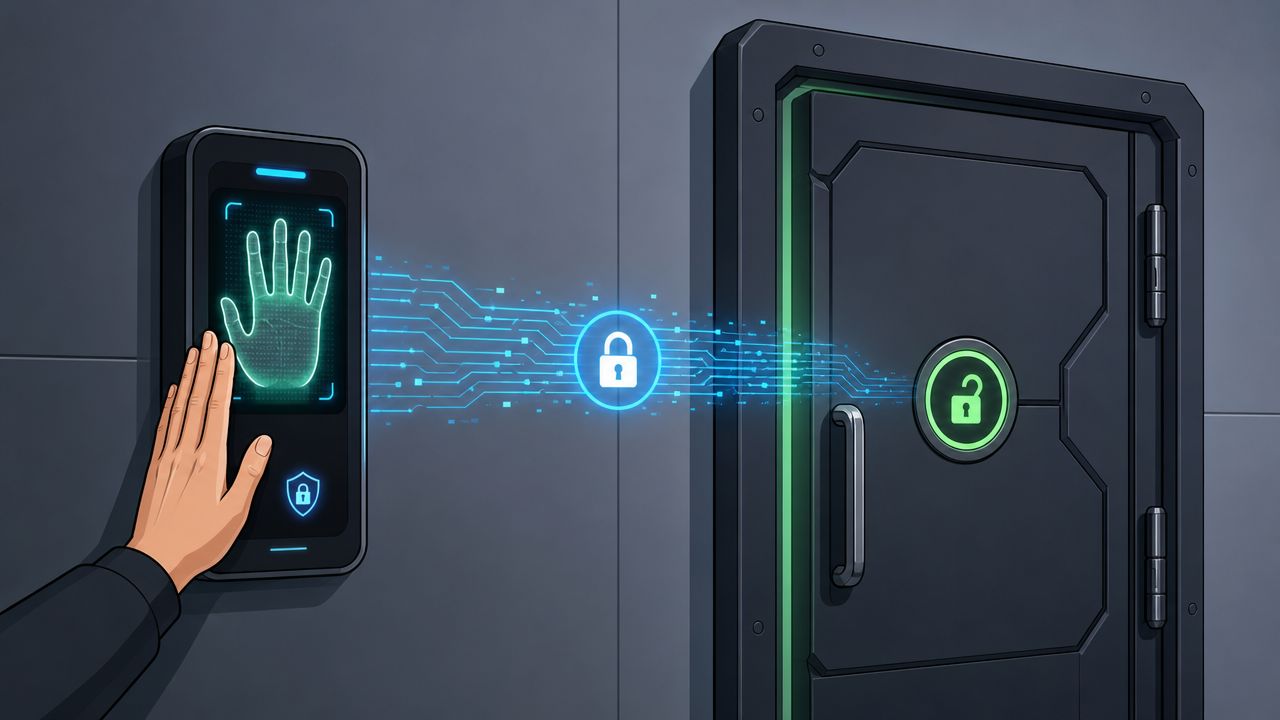
A biometric system confirms identity. The access control system decides what that identity is allowed to do at a specific opening. Then the door hardware, gate interface, or operator carries out that decision. It works like a relay team. If one handoff fails, the opening becomes a security gap, a safety problem, or a daily nuisance for staff.
What the biometric actually connects to
After a successful read, the controller sends an output to field hardware. In a commercial or industrial building, that usually means one of a few things:
- Electric strike: releases the latch on a pedestrian door
- Magnetic lock: releases a secured room or restricted area door
- Door operator input: starts an automatic opening cycle
- Gate, barrier, or dock interface: permits controlled movement into a managed area
The practical question for a facility manager is simple. What should happen at that opening, and what should never happen?
Where integration gets more demanding
A staff entrance is usually straightforward. The reader verifies the user, the controller checks permissions, and the strike or lock releases for a set time. A secure records room or server room may add tighter schedules, forced-door alarms, and named audit trails.
Loading docks are different.
An overhead door is not just a bigger version of a man door. It involves larger moving equipment, wider clearances, vehicle traffic, and more safety logic. In many Canadian facilities, the better design is not to let a biometric reader open the dock door directly. Instead, the biometric may authorize access to a dock office, a control station, or a supervised sequence that still depends on operator input, interlocks, and site safety rules.
That distinction affects both risk and workflow. If a warehouse supervisor is enrolled for biometric access, you may want that credential to get them into the dock control area, not to cycle a sectional door from the wall reader itself.
For facilities comparing layouts and hardware, this overview of door access control system components for commercial openings helps show how readers, controllers, electrified locking hardware, and egress requirements fit together.
Integration has to match how people actually move
Good integration starts with the opening's job. A front office door needs controlled entry and easy passage during busy periods. A staff-only warehouse transition door needs accountability without creating a lineup at shift change. A dock area may need separation between pedestrian access and equipment control so one identity check does not trigger the wrong action.
That is where many installations get awkward. The biometric piece may work perfectly, yet the daily routine still suffers because staff are carrying boxes, wearing gloves, escorting visitors, or passing through in waves. In practical terms, the door should support the task, not interrupt it.
Canadian sites also need to think about winter conditions, vestibules, and dirty work areas. A reader mounted in the wrong place can create read failures, tailgating pressure, or congestion near an exit path. Those are integration problems, not biometric problems.
Fail-safe and fail-secure decisions
Lock behavior during a power loss needs to be decided early, with the door type and code requirements in mind.
A fail-safe lock releases when power drops. A fail-secure lock stays locked when power drops. The right choice depends on the opening, the fire protection plan, egress rules, and the reason that door is restricted in the first place. For a facility manager, this affects more than security. It affects how the building behaves during an alarm, a power event, or a service call.
The reader is only the front end. The opening hardware determines whether the result is safe, consistent, and manageable for staff and contractors.
Wilcox Door Service Inc. handles commercial and industrial door integration work that can matter when biometric access has to connect with existing openings, operators, and locking hardware instead of being added as a standalone device. If your site includes healthcare records, employee medical areas, or other regulated environments, cyber testing of connected access systems may also come up during vendor review. In that context, some teams compare security partners such as Affordable Pentesting HIPAA services when reviewing how protected systems are assessed and documented.
Navigating Security Privacy and Canadian Compliance
In Canada, biometric access control is a privacy matter as much as a security matter.
That's the part many facilities underestimate. A card system already involves access rules and event logs, but biometrics moves the conversation into a more sensitive category because the credential is tied to the person's body.
Why biometrics gets stricter treatment
The federal Office of the Privacy Commissioner has repeatedly classified fingerprints, facial geometry, iris scans, and voiceprints as sensitive personal information, and its guidance says organisations should collect biometrics only for a specific, necessary purpose and avoid secondary uses without fresh consent or legal authority, as outlined in this discussion of Canadian biometric access control privacy expectations.
That changes the design standard. A biometric project can't be treated like a simple hardware swap from card reader to scanner. It needs policy decisions around:
- Purpose: Why this opening needs biometrics at all
- Necessity: Whether a less intrusive control could achieve the same result
- Consent and notice: What users are told before enrolment
- Retention: How long templates and logs are kept
- Access to data: Who can administer, retrieve, or delete records
- Scope control: Which doors and which users need biometric enrolment
Canadian laws and practical governance
For many private-sector organisations, PIPEDA is part of the framework. Provincial rules can add further requirements, especially in Quebec under Law 25, and in Alberta and British Columbia under their private-sector privacy laws. For facility leaders, the practical result is that a national or multi-site rollout usually needs a governance plan, not just a purchase order.
This is why many Canadian deployments end up with narrower enrolment groups than expected. A company may decide that only specific high-risk openings justify biometrics, while ordinary staff circulation remains on card or mobile credentials. That approach often makes more sense from both an operational and privacy standpoint.
Proportionality matters
A strong system isn't automatically an appropriate system.
Canadian privacy thinking has focused on necessity and proportionality. In plain language, if a normal card reader with proper administration would solve the problem, a biometric layer may be hard to justify at that opening. If, however, you need higher confidence that a specific authorised individual entered a restricted area, biometrics may be easier to defend.
A useful way to test proportionality is to ask:
- What actual risk are we solving?
- Why isn't card-plus-policy enough?
- Which people need biometric enrolment, and which do not?
- How will we handle refusal, exceptions, and deletions?
Privacy compliance isn't paperwork added after installation. It affects who should be enrolled, where scanners belong, and whether the deployment is defensible at all.
Some organisations also need their security planning to align with broader cyber and compliance review. In regulated environments such as healthcare-related operations, teams sometimes look at external security assurance resources like Affordable Pentesting HIPAA services as a reference point for how technical systems and compliance obligations intersect. The legal framework is different, but the operational lesson is similar. Sensitive systems need both technical controls and documented governance.
A legal reference point for controlled spaces
Canadian operators should also be aware that privacy expectations can remain meaningful even in controlled-access common areas. The Supreme Court of Canada's 2017 decision in R. v. Le is relevant here because it emphasised privacy interests tied to controlled-access residential and semi-private spaces, which has shaped how building operators think about identity verification, logging, and proportionality in secured properties, as discussed in this overview of biometric access control and the Canadian legal context.
That doesn't mean every commercial biometric system is problematic. It means operators should treat identity data with care, especially in mixed-use properties, residential-adjacent spaces, and buildings where access logs can reveal patterns about individuals.
Practical Considerations Before You Buy
Even a compliant design can become frustrating if the day-to-day user experience is poor.
The most common trouble spots are simple. The reader is mounted in bad light. The sensor gets dirty. Workers approach the opening with gloves, cartons, or cold hands. Security has no clear fallback method when a scan doesn't work on the first try. Those are operational problems, not technology failures.
Conditions at the opening
A few examples come up often:
- Dust and residue: Fingerprint readers need routine cleaning in industrial areas.
- Direct sunlight or glare: Facial and iris systems need thoughtful mounting and approach angles.
- PPE and winter gear: Face coverings, gloves, and hats can slow user flow if the system isn't chosen carefully.
- Traffic surges: Main shift changes may need a different setup than a low-traffic secure room.
Maintenance and exception handling
A biometric system needs the same discipline as any other critical opening.
- Test regularly: Confirm the reader, controller, lock release, and door operator all work together.
- Plan a fallback: Card, PIN, or staffed override procedures should exist for failed reads or temporary enrolment issues.
- Review enrolment lists: Remove inactive users promptly and confirm access groups still reflect actual job roles.
- Inspect the door itself: A perfect reader won't compensate for a dragging closer, weak latch alignment, or failing electrified hardware.
A biometric door is still a door. If the closer slams, the strike misaligns, or the operator drifts out of adjustment, users will blame the reader first.
There's also the budget question. Biometrics is usually justified less by novelty and more by reduced credential-sharing risk, stronger accountability at selected openings, and less time spent replacing physical credentials. The strongest business case usually appears where identity certainty matters more than simple convenience.
Your Deployment Checklist and Next Steps
A biometric rollout can fail long before the first reader is mounted. A plant manager approves facial recognition for a restricted production room, but no one has settled how templates will be stored, what happens when winter PPE blocks a scan, or who removes former staff from the system. The result is predictable. Delays at the door, privacy concerns from employees, and a security upgrade that creates extra work instead of tighter control.
That is why the final planning stage should read like an operating checklist, not a product wish list. For Canadian facility managers, the decision is not only about reader accuracy. It is also about whether the system fits your building, your staffing patterns, and your privacy obligations under PIPEDA and, in Quebec, Law 25.
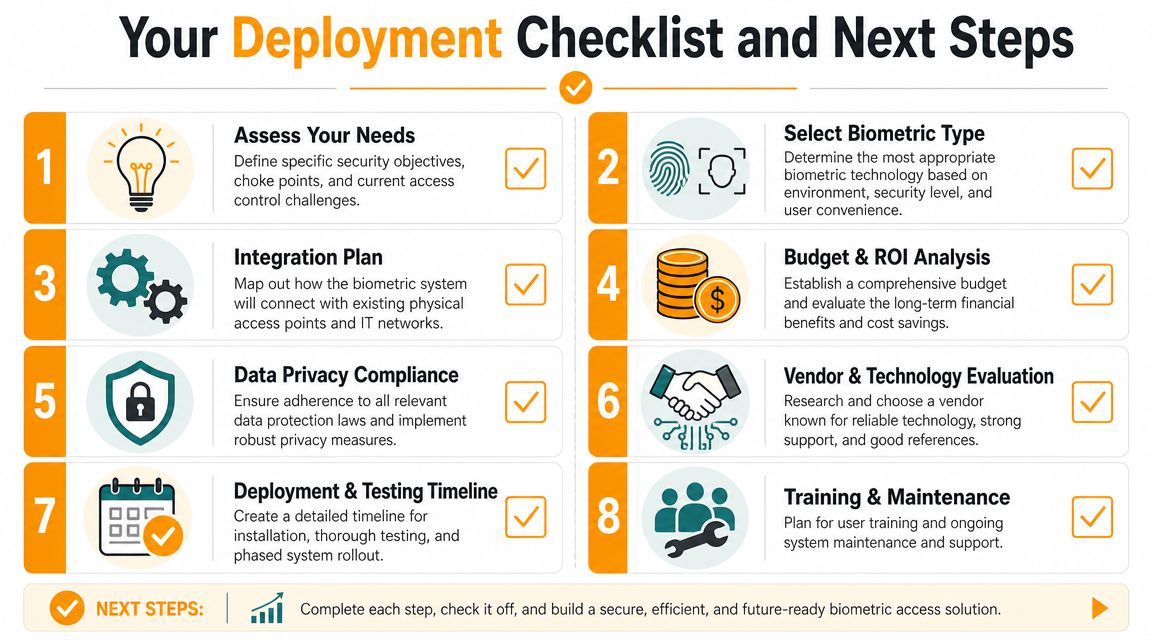
Deployment checklist
- Define the opening's purpose: Identify whether the door protects inventory, supports clean-room control, limits entry to a server room, or reduces credential sharing at a staff entrance.
- Match the reader to the actual environment: Review lighting, dust, moisture, gloves, face coverings, traffic peaks, and how quickly people need to pass through.
- Document privacy handling early: Decide what notice staff will receive, what form of consent or acknowledgement is appropriate, how long biometric data will be kept, and how deletion will be confirmed.
- Confirm system fit at the door: Review the frame, locking hardware, door operator, controller, power supply, fire alarm interface, and life-safety requirements as one connected opening.
- Create an exception path: Set a clear process for failed scans, temporary workers, visitors, and users whose biometric enrolment is incomplete.
- Assign ownership: Name the people responsible for enrolment, access changes, offboarding, audit review, and responding to privacy questions.
- Pilot before broad rollout: Test one or two openings first so you can see how the system performs during actual shift changes and delivery windows.
- Put it on the maintenance schedule: Include reader cleaning, access reviews, hardware inspections, and periodic testing in the same service routine as other security-critical doors.
Vendor questions help expose weak spots early. Ask where biometric templates are stored, who can access them, and whether storage is on the device, on a local server, or in the cloud. Ask how the system handles unionized environments, employee privacy requests, and deletion after termination. Ask what alternate credential keeps a shift moving if a scan fails at 6:00 a.m. on a cold Monday.
It also helps to treat the opening like a chain. The reader is one link. The lock, controller, operator, door condition, policy, and privacy process are the rest. If one link is weak, the whole opening becomes harder to secure and harder to manage.
If you are moving from planning to implementation, start with a site review that looks at the door, hardware, user flow, and compliance process together. For retrofit projects or new construction, professional access control system installation is a practical next step.
Wilcox Door Service Inc. can help you assess biometric access in the context that affects day-to-day operations most: doors, docks, traffic flow, and Canadian compliance obligations. If you are reviewing a retrofit, planning a new facility, or tightening security at selected openings, reach out to discuss a practical path that fits the building and the people who use it.