


Managing an apartment property with a ring of brass keys usually means the same set of problems keeps coming back. Lost keys. Rekeying after move-outs. Late-night lockout calls. Staff workarounds that grow into security gaps. What starts as a simple lock-and-key setup often turns into a constant administrative burden.
That's why apartment building access control systems have become a practical operations tool, not just a security upgrade. In Canada, a 2022 CMHC study highlighted the scale of multi-residential housing, with 1.9 million people living in over 800,000 social and affordable housing units, while the national rental apartment vacancy rate was 1.6% in 2022, which helps explain why property managers have strong reasons to improve security, reduce turnover friction, and make entry more convenient for residents (CMHC rental market context).
Value of access control isn't only at the front entrance. It shows up across the full lifecycle of the building. Better control over lobby doors. Cleaner visitor handling. Fewer physical keys in circulation. Faster changes when a tenant moves out or a contractor no longer needs access. Just as important, the system has to work properly with the door itself, the frame, the closer, the fire-rating requirements, and the day-to-day wear that comes with a busy building.
A lot of guides focus on apps and dashboards. The harder part is making sure the technology, the hardware, and the building all work together for years.
Securing Your Property Beyond the Master Key
A master key system looks organised on paper. In practice, many apartment teams end up chasing copies, signing keys in and out, and trying to remember who still has access to what. One tenant move-out can trigger lock changes. One lost grand master can create a building-wide headache.
Modern access control changes that workflow. Instead of replacing cylinders and redistributing keys, staff can issue or revoke a credential, update permissions, and track who entered which door. That matters in apartment buildings because entry isn't limited to one opening. You may be managing a lobby, side entrance, parcel room, bike storage, garage gate, staff room, and shared amenities all at once.
Where older key systems start to break down
Traditional keys still have a place on some openings, but they struggle when buildings need flexibility.
- Tenant turnover: Every move-out raises the question of whether keys were fully returned.
- Contractor access: Temporary trades often need access for a limited time, not a permanent key.
- Shared spaces: Amenity rooms and service areas need tighter control than a standard lock usually provides.
- Operational visibility: A metal key doesn't leave an audit trail.
Practical rule: If your team is spending more time managing keys than managing the property, the access method has become the problem.
What a modern system changes
Good apartment building access control systems don't just make entry electronic. They reshape daily operations.
A resident might use a fob, card, PIN, or phone. Staff can manage permissions centrally instead of visiting each door. Visitors can be screened through an intercom. Service vendors can receive access only for the doors and time windows they need.
That's a better fit for a tight rental market where occupied units, resident experience, and smooth operations matter. It also reduces one of the most common maintenance frustrations in multifamily properties: solving people problems with mechanical rekeying when the underlying need is better control.
The Four Core Components of an Access Control System
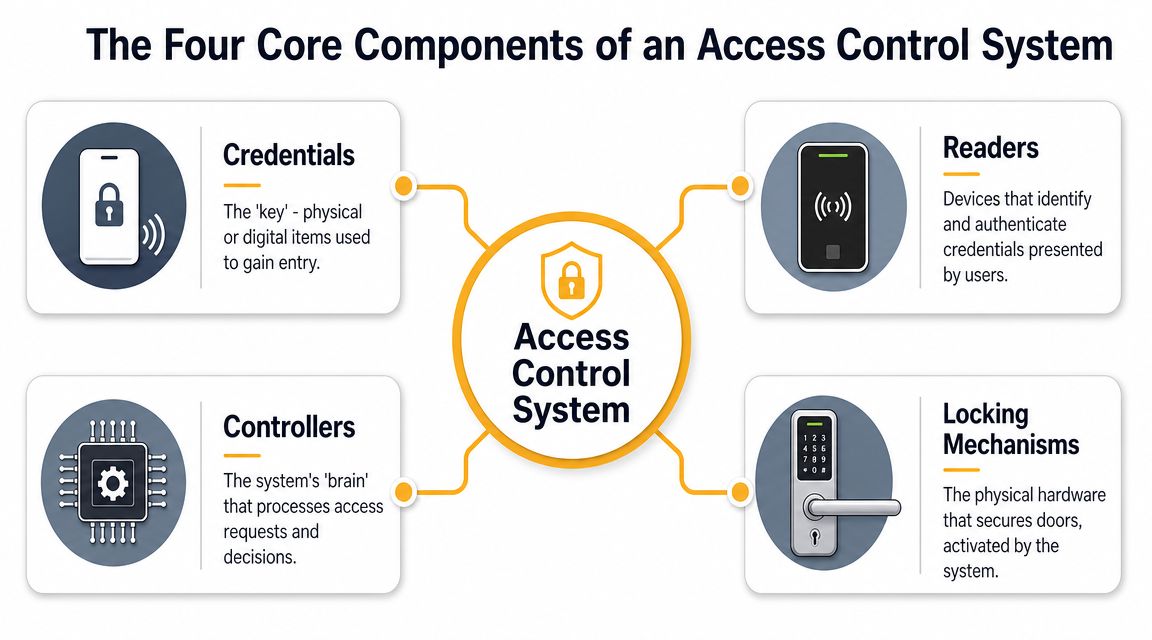
Every access system has product branding wrapped around it, but the architecture is usually straightforward. Imagine it as a digital doorman. One part checks the credential, one part decides, and one part operates the opening.
An effective setup uses a reader, a credential, a control panel, and a release mechanism, with the reader capturing the credential, the control panel evaluating permissions, and the release hardware opening the door. That centralised model also lets administrators revoke credentials quickly and maintain an audit trail of door activity (access control system fundamentals).
Credentials and readers
A credential is the digital version of a key. It might be a key fob, access card, PIN, or mobile credential on a smartphone.
The reader is the device mounted at the door or gate that receives that credential. If the credential is valid, the reader passes that request to the system for a decision. Readers are the part residents interact with, so they need to be intuitive and durable, especially at busy entrances exposed to weather, carts, deliveries, and repeated daily traffic.
Controllers and locking hardware
The control panel is the decision-maker. It checks whether that person has permission to enter that door at that time. If the answer is yes, it signals the release device.
The locking mechanism is the physical hardware that secures or releases the opening. In apartment settings, that may be an electric strike, a maglock, a gate operator, or an elevator interface.
Many projects falter at this point. Property teams sometimes buy software first and treat the door as an afterthought. But the opening is where the system succeeds or fails. If you want a plain-language overview of how the pieces fit together, this guide on what is an access control system is a useful starting point.
The software may approve access instantly, but if the door is misaligned, the closer is poorly adjusted, or the release hardware is wrong for the opening, residents still end up pulling on a door that won't open.
Why the four-part model matters
Understanding these four parts helps you cut through sales language. When you evaluate a system, ask simple questions:
- Credential choice: Will residents use fobs, cards, phones, PINs, or a mix?
- Reader suitability: Is the reader appropriate for indoor, outdoor, or vandal-prone locations?
- Controller logic: Can staff manage permissions centrally without calling a technician for routine changes?
- Release compatibility: Does the electrified hardware match the door type, frame, and use pattern?
That's the foundation. Everything else, including visitor management, video, integrations, and reporting, sits on top of it.
Exploring Types of Apartment Access Control
Not every apartment building needs the same access strategy. A small walk-up with one main entry has a different set of needs than a high-rise with multiple lobbies, garage access, parcel handling, lifts, and shared amenities. The right choice comes from matching the technology to the building's traffic, staffing model, and resident expectations.
One clear shift in the market is toward cloud-managed, mobile-first systems that combine access, intercom use, and visual event review. These setups let managers remotely grant or revoke access and review door events with video context, which helps reduce ambiguity when there's a dispute over visitor entry or an after-hours incident (cloud-managed apartment access control).
The common credential options
The most familiar systems still rely on keycards and fobs. They're simple, easy for residents to understand, and usually faster to adopt in buildings where not everyone wants an app. The trade-off is physical distribution. Fobs get lost, shared, forgotten, or returned late.
PIN keypads remove the need to hand out a physical device, but they come with their own issues. Codes get shared. Staff may need to reset them often. At a main residential entrance, that can become messy unless PINs are tightly managed and combined with another form of verification.
Mobile credentials are gaining traction because most residents already carry a phone. For property staff, this makes onboarding and offboarding cleaner. Permissions can often be changed without physically collecting anything. It also supports remote guest access and delivery workflows more naturally than older hardware-only systems.
Where specialised systems fit
Biometric systems can be useful in higher-security environments, but they're usually a narrower fit for apartment properties. They can introduce resident privacy concerns and may be harder to manage at scale if the goal is convenience for a mixed tenant population rather than strict control of a limited user group.
Smart locks at suite doors can work well in some buildings, especially where unit turnover or managed access is frequent. But they require careful planning. A suite lock is only one part of the resident journey. If the main entrance, garage, and amenity areas are still disconnected, the experience becomes fragmented.
For buildings with vehicle traffic, gate access may call for long-range readers, vehicle tags, or integrated controls. For sites where digital infrastructure matters across the property, teams sometimes also look at resources on secure Wi-Fi network access to understand how wireless access tools can affect deployment planning and reliability.
Comparison of Access Control Technologies
| Credential Type | Resident Convenience | Security Level | Management Overhead | Typical Cost |
|---|---|---|---|---|
| Key fobs and cards | Familiar and easy to use | Good when credentials are controlled properly | Moderate because physical credentials must be issued and replaced | Varies by system and door hardware |
| PIN codes and keypads | Convenient for occasional users and trades | Moderate, depends on code discipline | Moderate to high if codes are shared or changed often | Varies by setup |
| Mobile credentials | High convenience for most residents | Strong when tied to managed permissions | Lower for credential handling, but depends on software administration | Varies by platform and subscriptions |
| Biometric readers | Convenient once enrolled | Can be strong for restricted environments | Higher due to enrolment, privacy, and specialised support | Usually higher than basic credentials |
| Mixed systems | Flexible across resident, visitor, and staff use cases | Strong when policies are clear | Moderate because more parts must be coordinated | Varies based on integration depth |
The hardware still matters
Technology choice should always lead back to the opening. A sleek credential won't fix a bad hardware decision.
A lobby door with high traffic may need a different lock type than a parcel room. A gate operator has different service demands than a pedestrian entrance. If a project calls for magnetic locking, it helps to understand where mag locks for doors fit well and where another release method may be a better choice.
A resident judges the whole system by one simple question. “Did the door open the first time I tried it?”
That's why the best-performing apartment systems are rarely the most feature-heavy. They're the ones that are easy to administer, matched to the building, and backed by hardware that works consistently under real traffic.
Key Design and Integration Considerations
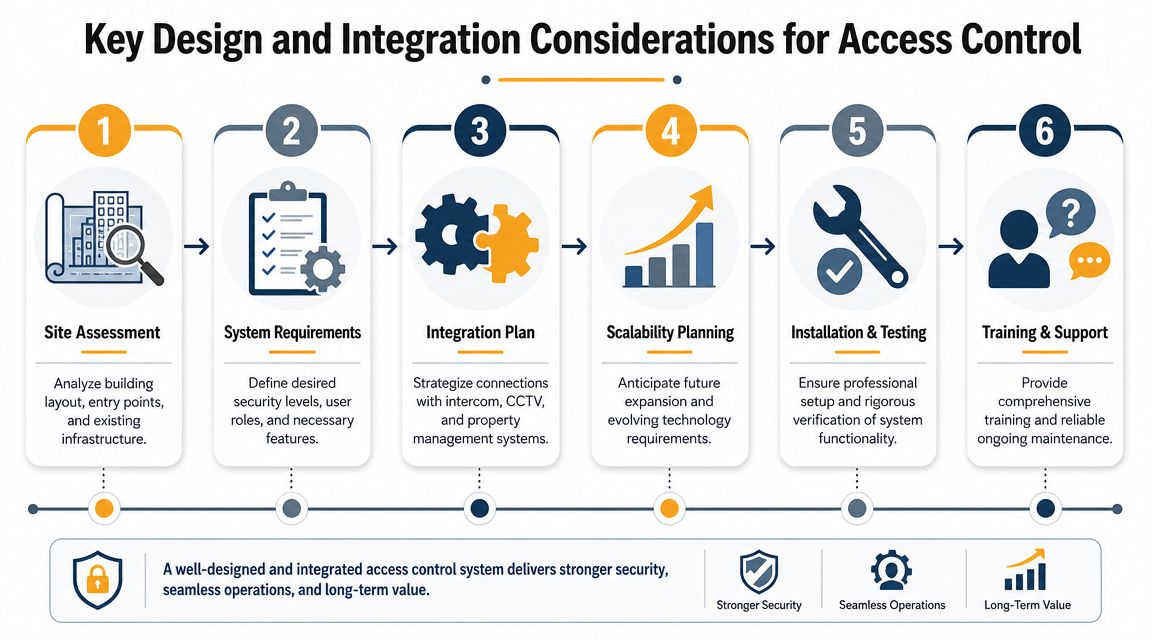
An apartment access system isn't a standalone gadget. It becomes part of the building's operating infrastructure, just like the door closer, the fire alarm interface, the lift controls, and the parking equipment. If those pieces are planned separately, the finished system often feels unreliable even when each individual component is technically functional.
The better approach starts with the building itself. How people enter. Where they queue. Which doors slam. Which openings are exposed to wind. Which spaces need restricted access only at certain times. Those aren't software questions. They're site questions.
Start with the opening, not the app
A proper site assessment should identify more than door count. It should look at frame condition, power availability, wiring routes, door material, existing hardware, and whether each opening is a good candidate for electrification.
A narrow aluminium vestibule door behaves differently from a hollow metal service door. A fire-rated corridor door has different constraints than a non-rated storage room. A garage gate has a different duty cycle than a resident lounge entry. Those choices affect the release hardware, the reader location, and the maintenance plan.
- Door condition: A sagging or poorly latched door shouldn't be electrified until the mechanical issues are corrected.
- Traffic pattern: Main entrances need hardware that can handle repeated cycles without constant adjustment.
- Environmental exposure: Exterior openings need components suited to moisture, temperature swings, and dirt.
- Use case: Staff-only doors, visitor entries, and resident amenities often need different logic.
Integrate with the systems residents already use
Residents don't think in terms of separate building systems. They think in terms of getting from the street to the right place with minimal friction.
That's why integrated design matters. The lobby reader may need to work with a video intercom. The parking entry may need to align with gate controls. An elevator may need floor permissions tied to the same credential. The front entrance may also need an automatic operator so access is not only secure but usable.
If the building is being upgraded or retrofitted, an experienced installer should map those interactions before hardware is ordered. A practical reference point is access control system installation, especially for understanding how access devices, locks, and doors are coordinated during a real deployment.
Think beyond day one
The smartest design question is often, “What will this building need in a few years?” Amenity spaces change use. Staffing changes. Properties add parcel rooms, camera upgrades, or visitor workflows.
That doesn't mean overbuilding every site. It means avoiding dead-end choices. Leave room for additional readers, future integrations, and cleaner administration. A system that works only for today's layout often becomes expensive to expand later.
Field note: The cheapest design on bid day can become the costliest one to live with if each new opening requires a custom workaround.
Navigating Security Compliance and Tenant Privacy

Compliance gets treated as a final review item too often. In reality, it should shape the design from the beginning. An apartment access system doesn't just decide who gets in. It also interacts with life-safety hardware, emergency egress, and personal data. Those issues belong in the same conversation.
In Canada, the National Building Code of Canada 2020, issued in 2022, is a key reference point for multifamily access-control and egress planning. Access systems must not compromise life safety, which directly affects how controlled doors in lobbies, amenity spaces, and similar openings are configured for free egress and fire compliance (Canadian code reference for access-control planning).
Life safety is part of the system, not a separate check
The moment you add electrified locking hardware to a door, you've moved into a code-sensitive area. The lock, the closer, the latch, the releasing device, and the fire-rating condition all matter together.
Property teams should ask practical questions early:
- Egress behaviour: Can occupants leave freely from the secure side when they need to?
- Fire door status: Is the opening rated, and if so, is the selected hardware appropriate for that assembly?
- Door operation: Does the closer shut and latch the door reliably after each cycle?
- System interface: If the building has fire-related requirements tied to the opening, has that been addressed in the design?
A modern credential doesn't make a door compliant. The opening either works as required, or it doesn't.
Privacy needs equal attention
Cloud dashboards, event logs, and video-linked access records are useful operational tools. They also create responsibility. Managers need clear internal rules for who can view access logs, who can grant permissions, how credentials are assigned, and how resident information is handled.
The specifics of privacy law vary by jurisdiction and organisation, but the practical lesson is universal. Collect only what you need. Limit administrative access. Keep records organised. Document your process. For teams trying to build better internal discipline around data handling, examples from outside Canada can still be helpful. These Philippine data privacy lessons are useful as cautionary reading because they show how operational lapses around personal information can turn into larger problems.
Security controls that improve accountability can also create new risk if too many people can see, export, or misuse resident data.
Why expert coordination matters
An access control project crosses multiple trades and responsibilities. Security, electrical, doors and frames, fire compliance, and property operations all touch the same opening. If no one is coordinating the whole picture, small gaps appear fast.
The safest approach is to treat compliance and privacy as design criteria, not paperwork. That usually leads to fewer surprises during inspection, fewer resident complaints, and fewer liability questions after the system goes live.
How to Select the Right System for Your Property
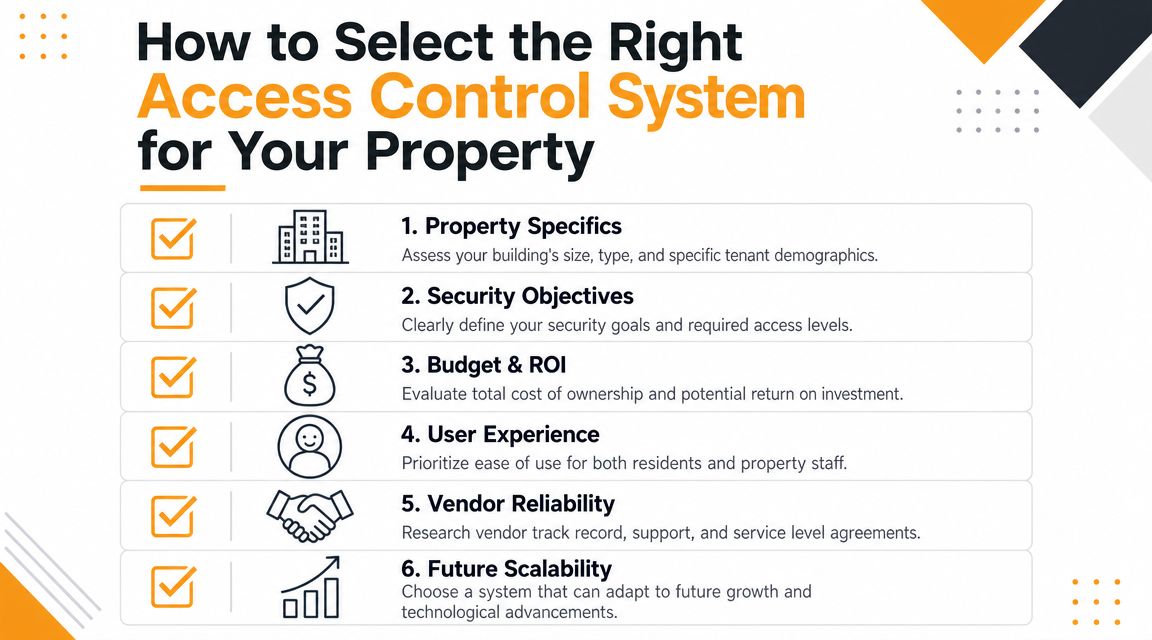
The right system isn't the one with the longest feature list. It's the one your staff can manage, your residents can use without confusion, and your building can support without constant service calls.
Selection gets easier when you stop shopping by brand first and start with operating requirements. How many entry points need control. Which users need access. How often permissions change. Whether the property team works on site daily or across multiple locations. Those answers usually narrow the field quickly.
Questions worth asking before you buy
Use a short checklist during evaluation.
- Fit for the property: Does the system match the building's size, traffic pattern, and resident mix?
- Administrative simplicity: Can your staff add, revoke, and adjust permissions without a complicated process?
- Hardware compatibility: Will it work cleanly with the existing doors, frames, and release hardware, or will retrofits become extensive?
- Resident experience: Is entry straightforward for residents, visitors, deliveries, and trades?
- Support model: When something fails at a door, who responds and who owns the fix?
- Scalability: Can you extend the same logic to future doors, gates, or amenities without rebuilding the platform?
Some managers find it helpful to review broader summaries of modern access control options before narrowing down product categories and operational priorities.
Look at total ownership, not just initial price
An inexpensive quote can hide future friction. Subscription fees, hardware replacement, site visits, credential handling, and ongoing adjustments all affect the cost of ownership. So does downtime. A front entrance that becomes unreliable creates staffing and resident-service costs even if the original installation looked affordable.
This video gives a useful visual overview to support that evaluation process.
Choose a partner who understands doors as well as software
Here, many procurement decisions go astray. The access platform may be solid, but the installer may not fully understand commercial door operation. That gap shows up later as nuisance openings, poor latch alignment, weak closing, and resident complaints.
One practical option in Canada is Wilcox Door Service Inc., which installs and services access control components on commercial doors, including readers, request-to-exit devices, sensors, electric strikes, magnetic locks, and panels, with integration to a wide range of openings. That matters because software support and door hardware support shouldn't live in separate silos when the whole system depends on both.
Best Practices for Deployment and Maintenance
A clean installation day doesn't guarantee a successful system. Most long-term problems show up after handover, when residents start using the system at full volume and staff begin handling real tenant moves, deliveries, vendor visits, and after-hours issues.
Deployment should be structured. Residents need clear instructions. Staff need role-based training, not just a quick software demo. Building operators need to know what's normal, what isn't, and when to call for service before a minor issue turns into a locked-out entrance.
Handle rollout like an operations change
Tenant onboarding matters. If the credential process is confusing at launch, the property team will spend weeks answering avoidable questions.
A practical rollout usually includes:
- Resident communication: Explain how entry works, what the credential options are, and who to contact for support.
- Staff procedures: Define who can issue credentials, revoke them, and review event history.
- Visitor workflows: Set consistent rules for deliveries, contractors, and temporary guests.
- Fallback planning: Keep a documented process for lockouts, failed credentials, and after-hours incidents.
Maintain the opening, not just the software
This is the part many tech-focused guides miss. Access control hardware lives on moving openings. Doors sag. Closers drift out of adjustment. Strikes collect debris. Magnets lose alignment. Automatic operators need tuning. A dashboard may say the command was sent, but the opening still has to perform physically.
Canadian guidance often overlooks this practical risk, but it matters because access-controlled openings tied to life-safety hardware must preserve free egress and comply with fire codes, which requires coordination with the access system, door hardware, closer settings, and fire door inspection programs (access control and life-safety coordination).
A maintenance plan should inspect the whole opening assembly. Credential response, lock release, latch engagement, closer function, wiring condition, and door alignment.
Build a routine that catches small failures early
Good maintenance is repetitive by design. Check the entrance before residents complain. Review recurring denied events for user confusion or hardware trouble. Test the release device under normal traffic conditions. Confirm the door closes and latches after each cycle.
For apartment properties, that lifecycle approach is what protects the investment. The goal isn't only to keep the software online. It's to keep the building usable, secure, and code-aware through daily wear.
Your Partner for Secure and Efficient Access
Apartment building access control systems work best when they're treated as part of the building, not as a bolt-on app. The strongest results come from matching the right credential strategy with the right door hardware, release method, wiring plan, and maintenance program.
That lifecycle view matters. A system should help your team reduce key handling, tighten control over who enters where, and give residents a smoother experience. It also has to stay dependable under real traffic, support safe egress, and remain serviceable over time.
For property managers, the practical goal is simple. Fewer access headaches. Better visibility. Less friction at the door. More confidence that the system will still perform months and years after installation.
Wilcox's brand promise is Respected Partners, Reliable Service. If you're evaluating a retrofit, planning a new build, or trying to solve recurring issues with an existing entry setup, the next step is to review the openings themselves and build the access plan around how the property operates.
Frequently Asked Questions
Can I integrate an access control system with my existing doors?
Often, yes. Many apartment buildings can retrofit access control onto existing commercial pedestrian doors. The important part is compatibility. The door, frame, closer, latch, and fire-rating status all affect whether an electric strike, magnetic lock, or another release method is appropriate.
A site assessment should come before hardware selection. That prevents a common mistake: choosing electronics first and discovering later that the opening needs mechanical correction before electrification will work properly.
What happens if the power or internet goes out?
This depends on system design, but professional-grade systems are usually planned with backup and local decision-making in mind. The exact behaviour of each opening should be reviewed during design because not every door has the same security or life-safety role.
What should never be left to assumption is egress. People inside the building still need a safe way out, and the opening should be configured accordingly.
How much does an apartment access control system cost?
Costs vary widely based on the building layout, number of controlled openings, hardware condition, and the type of credential and management platform you choose. A simple shared entrance setup is very different from a full property-wide system that includes intercoms, gates, lifts, and amenity control.
The better way to budget is to look at total cost of ownership. That includes installation complexity, software or cloud fees, hardware servicing, and the maintenance required to keep each opening operating reliably.
If you're planning or upgrading an apartment access system, Wilcox Door Service Inc. can help you assess the full opening, not just the reader on the wall. Contact the team to schedule a site review, request a quote, or discuss a maintenance strategy that supports secure, efficient, code-aware building access.