


If you're managing a commercial site with a ring of master keys, spare keys, contractor keys, and mystery keys nobody wants to admit to losing, you already know the weak point in old-school security. A lost key turns into a rekeying job. A copied key leaves you guessing who still has access. And when something goes wrong at a side entrance or service corridor, there's no record of who tried the door or when.
That's where the access control system working principle matters. It's not just about replacing a key with a card reader. It's about making entry decisions based on who the person is, where they're trying to go, and whether they should be there at that time.
For a facility manager, that changes daily operations. You can control office doors, warehouse pedestrian doors, maintenance rooms, server rooms, and perimeter entry points from one organised system instead of a patchwork of cylinders and keys. You also gain a record of events, which is often just as important as the lock itself.
This is the practical version. No buzzwords. Just how the system works at the door, what hardware matters, where sites get into trouble, and what holds up at a busy commercial property. For sites dealing with multiple openings and restricted zones, door access control systems for commercial facilities are the modern answer to the keyring problem.
Beyond the Janitors Keyring Modern Facility Security
A lot of access control upgrades start the same way. A tenant changes. A supervisor leaves. A carded storage room is needed for inventory, records, or tools. Someone notices that too many people have keys to too many doors, and no one can say with confidence who still has what.
Mechanical keys still have their place, but they don't scale well in a busy facility. In a warehouse or multi-tenant building, one missing key can force a hard decision. Do you accept the risk, or do you change hardware across several doors? Neither option feels efficient when the underlying issue is lack of control.
Electronic access control fixes the part that keys never could. It lets the site assign unique credentials, remove access without changing the lock body, and tie each opening to a rule. That rule can reflect a role, a location, or a schedule. It's a better fit for commercial operations where access isn't the same for office staff, cleaners, dock personnel, maintenance trades, and after-hours contractors.
A secure door is only part of the job. A managed door is what helps a facility run properly.
In practice, this matters most at the edges of the building. A front office entrance needs a different level of control than a shipping office. A warehouse pedestrian door needs different handling than a lunchroom. A side door near the loading dock often needs tighter oversight than people expect, because it becomes a shortcut unless the system is set up properly.
Modern access control also fits the Canadian facility environment better than a key-only approach. Controlled openings often sit alongside egress requirements, fire separations, and restricted areas. That's why the conversation isn't only about security. It's also about safe operation, code awareness, and clear accountability when people move through the building.
The Four Core Components of an Access Control System
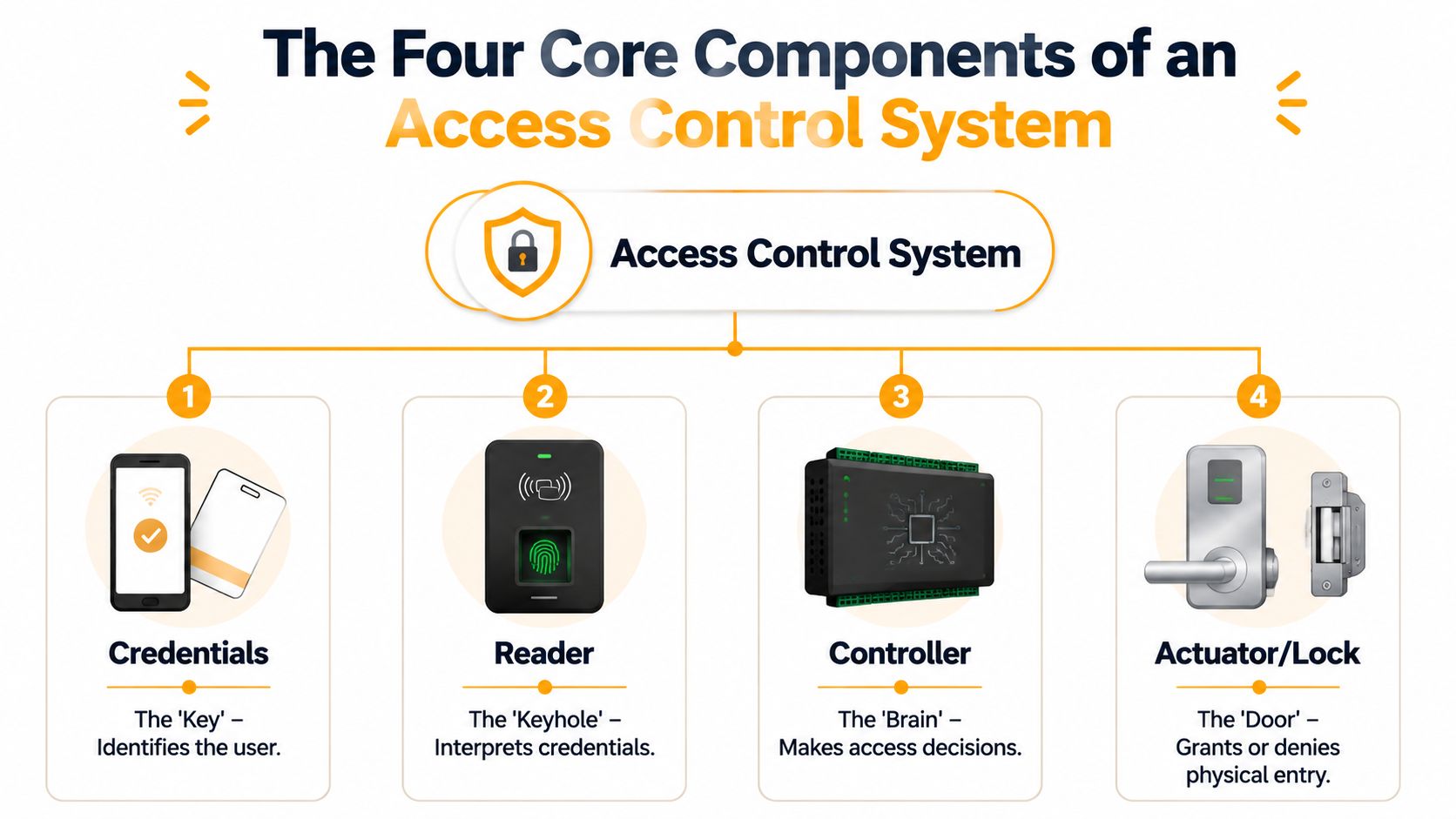
A facility manager usually notices these parts when one of them fails. The badge reads, but the door does not release. The lock releases, but the event never shows in the system. A side gate works in dry weather and starts misreading cards after a week of snow and grit. Those problems make more sense once you know the five pieces involved: credential, reader, controller, locking hardware, and the software that ties them together.
Credentials
The credential is what the user presents to request entry. That can be a card, fob, PIN, phone credential, or biometric factor.
At the site level, the right choice depends on daily use, turnover, and how often people arrive with full hands, gloves, or shared equipment. Cards and fobs are still common because they are cheap to issue and easy to replace. Mobile credentials cut down on lost cards, but they also depend on phone battery life, user setup, and IT support. PINs are simple, but they get passed around. Biometrics can fit high-security rooms, though they need cleaning, user enrollment, and a realistic plan for failed reads.
For many commercial sites, RFID is the practical starting point because it balances speed, cost, and reliability at busy openings. This overview of RFID access control system basics covers where that approach fits best.
Readers
The reader captures the credential and passes the data into the system. It does not make the final decision.
This is where field conditions matter. A reader at a clean office entry has an easier life than one mounted at a shipping door, cold room entrance, or exterior gate post. Dust, moisture, forklifts, glare, and winter gloves all affect performance. Reader placement matters too. Mount it too close to metal, too far from the approach path, or on the wrong side of a bollard, and staff start twisting, reaching, or tailgating to get through.
Vehicle access uses the same principle, just with different hardware at the opening. Sites comparing pedestrian and perimeter entry setups often run into the same trade-offs discussed in these driveway gate options in Ottawa, especially around weather exposure, traffic flow, and safety devices.
Controllers
The controller applies the rules. It receives the credential data from the reader, checks the permissions for that user and opening, then tells the hardware to release or stay locked.
From a maintenance standpoint, this is the part that separates a basic door release from a managed system. The controller stores or checks door schedules, access groups, input status, and alarm conditions. If a door is forced open, held too long, or left offline, the controller is usually the point where that condition gets registered. Guidance from UL on electronic access control system units also reflects how controllers sit at the center of the decision and interface with connected devices and life-safety functions in commercial installations, as outlined in UL 294 access control system requirements.
Locks and door hardware
The locking device turns the system decision into a real door action. That may be an electric strike, magnetic lock, electrified lever, delayed egress device, or electrified panic hardware.
The hardware has to match the opening, the traffic, and the code requirements. A glass aluminum storefront door often needs a different solution than a hollow metal personnel door in a warehouse. A man door near a loading dock takes abuse from carts, pallets, and rushed traffic, so hardware choice affects service calls as much as security. I tell facility teams to treat this as a door-and-frame decision, not just an electronics decision, because the wrong hardware on the right software still creates nuisance problems.
A few common fits show the difference:
- Office glass entry doors: Often use maglocks or electrified hardware where frame condition and appearance matter.
- Warehouse personnel doors: Often use electric strikes or electrified panic devices that hold up better under heavy daily use.
- Interior restricted rooms: Often use electrified cylindrical or mortise locks where staff still need normal free egress from inside.
Management software
The software is where staff assign access, change schedules, review events, and disable credentials without touching the door hardware.
Good software also shortens troubleshooting. It should let the site answer basic questions quickly. Who opened the shipping office after hours? Which doors are offline? Which contractor card is still active after the job ended? If those answers take too long to find, the problem is usually configuration, naming, or user permissions, not the door hardware itself.
Practical rule: If your team cannot quickly confirm who has access to a specific opening, the system is harder to manage than it should be.
How It Works The Authorization Workflow in Seconds
At 6:55 a.m., the employee entrance is stacking up, the first trucks are backing into the dock, and one bad reader decision can turn into a line at the door. That is why facility managers need to know what happens between a card tap and a released lock. The workflow is fast, but every step has a job, and each step gives you a place to troubleshoot when a door starts acting up.
What happens first at the door
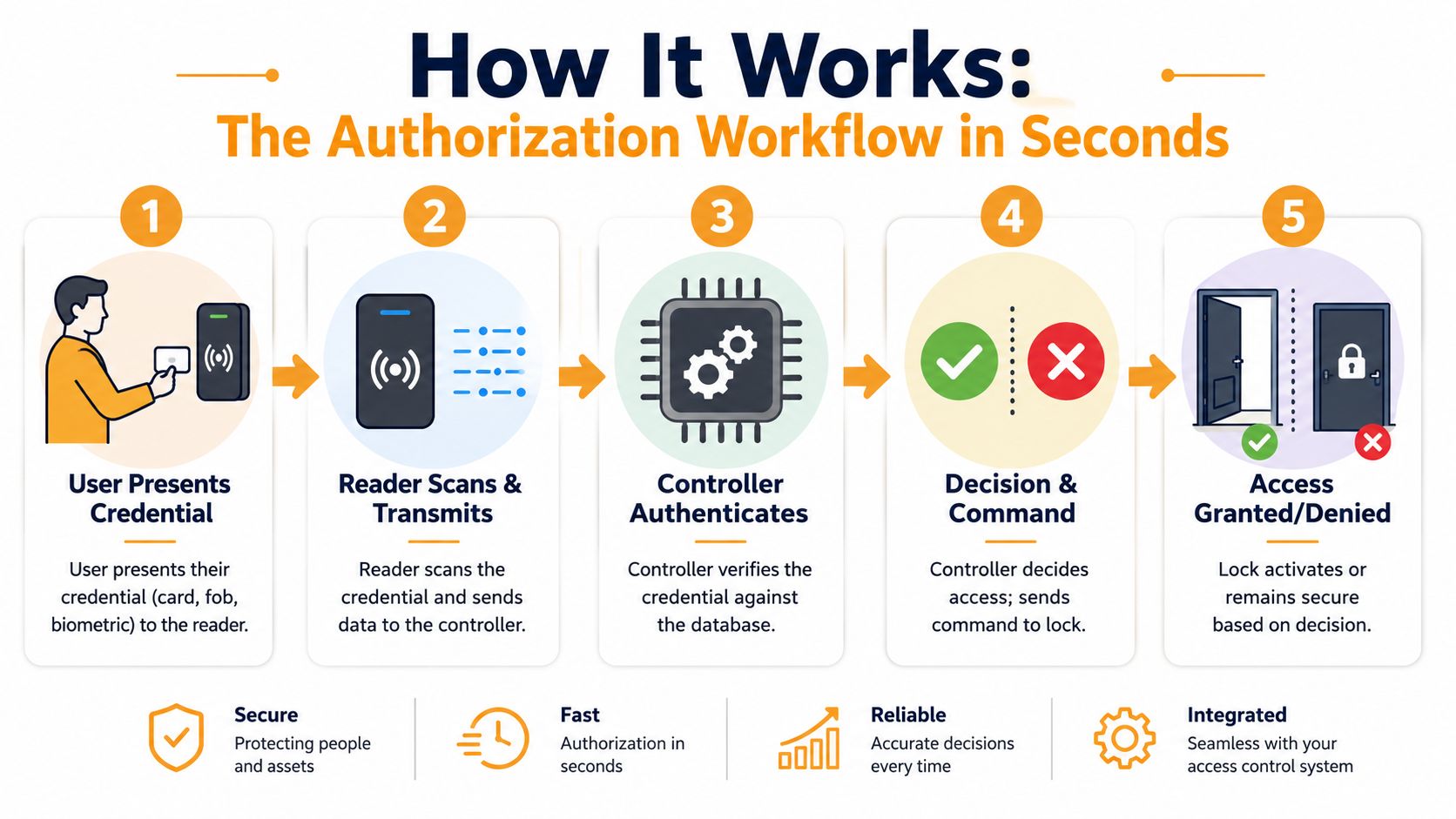
A working access control cycle is straightforward. A user presents a credential. The reader passes that data to the controller. The controller checks whether the credential is valid for that opening and that time period. If the answer is yes, it signals the locking hardware to release for a set interval and records the event. If the answer is no, the door stays secure and the denied attempt is still logged. The Security Industry Association outlines this credential-read, decision, and release sequence in its overview of access control basics and system operation.
On site, I break that sequence into six checkpoints:
Presentation
The user taps a card, enters a PIN, opens a mobile credential, or uses biometrics.Read
The reader captures the credential data and sends it to the panel or controller.Validation
The system confirms the credential is active and recognized.Permission check
The controller checks the door, schedule, and any rules tied to that user.Release
If approved, the controller triggers the strike, lock, or operator for the programmed time.Record
The system logs the event, approved or denied, so staff can review it later.
A useful visual reference is below.
Why speed matters
At the door, people judge the whole system by one thing. Does it respond fast enough that traffic keeps moving?
A slow decision cycle creates real site problems. Staff start pulling on doors before the lock releases. Shipping crews hold doors open at shift change. Security gets calls about a “bad reader” when the actual issue is a network delay, a controller fault, or a schedule mismatch. At a busy employee entrance or a warehouse man door near the dock, even a small delay changes behavior.
That is also why the lock and door condition still matter during an authorization event. The credential can be approved correctly, but if the strike is preloaded, the closer is fighting the opening, or the latch is dragging on the frame, users experience it as an access failure.
Where facility managers usually see failures
The workflow rarely fails in the abstract. It fails at a specific point in the chain, and the symptoms usually tell you where to look first.
- Credential is active, but the user is still denied: Check access levels, door groups, and schedules before replacing hardware.
- Reader beeps, but the door does not open: Check whether the controller sent a release signal, then inspect strike operation, latch alignment, and door pressure.
- Door works for one shift but not another: Review time zones, holiday schedules, and cleaning or contractor permissions.
- Intermittent problems at exterior or dock doors: Inspect readers, cabling, and hardware for moisture, dust, vibration, and impact damage.
- Events are missing or unclear: Fix door naming, user records, and log settings so the event history answers real operational questions.
If your site uses cards or fobs, this same sequence applies to an RFID access control system for commercial doors. The credential is read, checked against permissions, acted on at the door, and stored in the audit trail.
The same logic also extends beyond pedestrian openings. Gates use the same basic decision path, just with different operators and safety devices. For a simple example of how credentialed entry principles apply to vehicle access, see these driveway gate options in Ottawa.
Choosing the Right System Types and Technologies
A facility manager usually feels the system choice at 6:00 a.m., not in the demo. The front office door has to admit staff without delay, the shipping office has to stay limited to the right people, and the side door by the dock cannot turn into a convenience entrance for everyone on site. System type and credential choice decide how well that holds up after turnover, weather, contractors, and day-to-day use start putting pressure on it.
Standalone versus networked
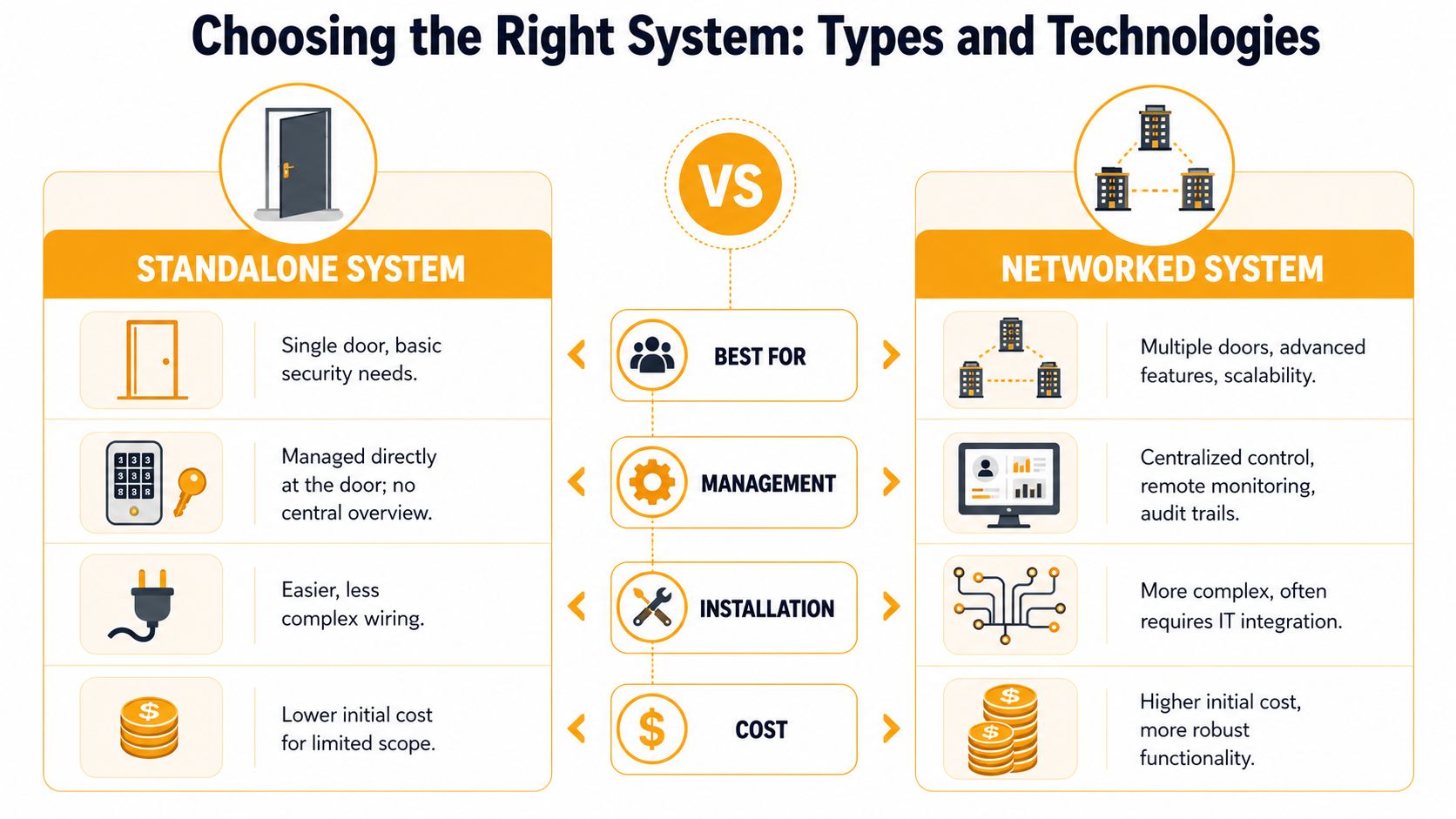
Start with management model, because that drives service burden, visibility, and how fast your team can make changes.
| System type | Works well for | Main limitation | Practical fit |
|---|---|---|---|
| Standalone | One door or a very small number of openings | No central oversight | Small rooms, utility areas, isolated access points |
| Networked | Multiple doors and changing staff permissions | More planning and coordination required | Warehouses, commercial buildings, industrial facilities |
A standalone system suits an isolated opening with a short, stable user list. It can work well for a storage room, electrical room, or a single controlled entrance where changes are rare.
A networked system makes more sense once the site has regular staff changes, outside service providers, scheduled access, or several restricted areas. Central management saves time, but the primary benefit is control. Security can remove a user once instead of visiting multiple doors, and management can see what happened at each opening without chasing down separate devices.
There is a trade-off. Networked systems ask for better planning up front. They also depend more on good naming, clean programming, and supportable infrastructure. On a commercial site, that extra setup usually pays for itself quickly.
Choosing the right credential technology
The credential has to match the opening, the traffic pattern, and the level of accountability you need.
Cards and fobs
Cards and fobs are still a practical choice for many sites. They are fast to issue, familiar to users, and easy to replace when a person changes roles.
Their weakness is not technical. It is administrative. People lend them, lose them, and forget to return them. If a site uses cards or fobs, someone needs a disciplined process for enrollment, deactivation, and regular review, or the system slowly drifts away from the actual staff list.
PIN keypads
PINs work at low-risk openings where convenience matters more than individual accountability. They also avoid the cost and handling of physical credentials.
The downside shows up fast on busy sites. Codes get shared. Once several people know the same code, event history stops answering who entered and starts showing only that the door was used. That may be acceptable for a staff break area. It is a poor fit for inventory, records, hazardous materials, or any door tied to incident review.
Mobile credentials
Mobile credentials fit facilities that already rely on phones for communication, job tracking, or service dispatch. They reduce badge handling and can make remote provisioning easier, especially across multiple buildings.
They also create a different support list. Dead phone batteries, damaged devices, replacement phones, app permissions, and user setup become part of the access conversation. Before choosing mobile credentials, decide what happens when the phone is missing or unusable. A backup method at the door prevents avoidable lockouts and service calls.
Biometrics
Biometrics belong at openings where confirming the person matters more than pushing people through quickly. That can include a lab, data room, controlled production area, or another sensitive interior space. For sites considering that route, biometric access control systems for commercial facilities are one option to review against the room use, traffic level, and maintenance conditions.
They are not a universal upgrade. Dirt, gloves, moisture, and heavy shift changes can slow entry and raise frustration. On some openings, biometrics improve control. On others, they create lineups and more support work than the risk justifies.
Match the credential to the risk, the traffic, and the way the opening is actually used.
The Canadian code and life-safety reality
Electronic access has to work with the building, not just the software. In Canada, that means the opening still has to satisfy fire, egress, and life-safety requirements under the codes and standards that apply to the site. A reader, electric strike, maglock, request-to-exit device, or door operator cannot be selected in isolation from the door assembly and the exit path.
This is one of the most common specification mistakes we see in the field. A manager chooses the access platform first, then tries to force the hardware onto an opening that has different egress, rating, or occupancy requirements. The software may be fine, but the opening is still wrong for the building.
What a practical selection process looks like
A good selection process starts at the door and works outward.
- Define the opening's job: Main entrance, staff entrance, warehouse side door, restricted room, shipping office, or interior circulation door.
- List the user groups: Employees, supervisors, cleaners, technicians, temporary contractors, and delivery staff.
- Set the accountability level: Shared access, named-user tracking, or high-certainty identity verification.
- Review site conditions: Dirt, moisture, vibration, glove use, traffic peaks, and after-hours operation.
- Check code and hardware constraints: Fire-rated doors, exit routes, door closers, electrified hardware, and release requirements.
- Plan the service model: Who adds users, who audits permissions, and who gets the call when a dock-side reader fails in February.
For broader planning, some facilities also look at integrated access control system solutions for commercial sites when they need one coordinated setup across multiple openings and departments.
Integrating Access Control with Doors Docks and Buildings
A facility manager usually notices integration problems at the worst time. The shipping team is waiting on a trailer, a side door is held open with a wedge because the hardware is fighting the closer, and the access software still shows every credential event as normal. The system made a decision, but the opening did not perform the job the site needed.
Doors need to do more than grant access
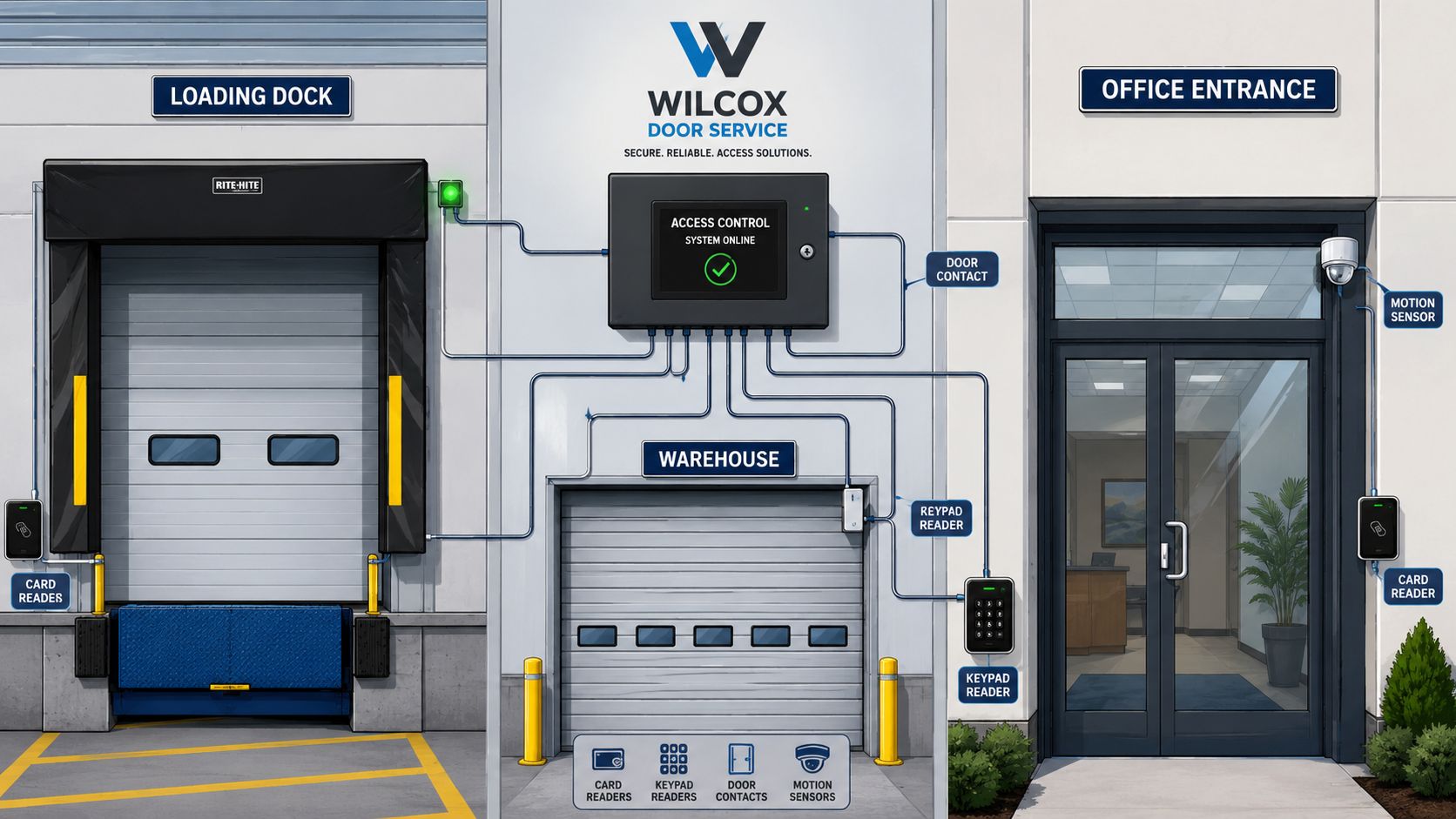
At the door, access control has to work with real hardware. Reader position, electric strike or lock choice, closer force, latch alignment, weather exposure, and traffic volume all affect whether the opening behaves properly through a full day of use.
A front office entrance and a warehouse man door may use the same credential, but they should not be treated as the same opening. The office door may see moderate traffic in a clean environment. The warehouse door may deal with dust, gloves, carts, pressure changes, and repeated impacts. If the hardware package does not match those conditions, the site gets nuisance alarms, bad latching, propped doors, and avoidable service calls.
That is why access control is often coordinated with commercial overhead doors and nearby personnel doors. On working sites, people do not separate security from operations. If a badge read is approved but the opening is slow, misaligned, or hard to use while carrying materials, staff will find another route.
Loading docks need sequence, not just credentials
The dock is where access control has to match process. A reader at the shipping office door is only part of the picture. The safer approach is to align people access with what the dock equipment is doing and what stage the loading activity is in.
That can include coordination with dock levelers and truck restraints. For example, a site may want certain doors active only when a trailer is properly secured, when the bay is assigned, or when the approved shift is working that area. Those rules reduce confusion and cut down on the shortcuts that cause injuries and inventory problems.
At a loading dock, sequence errors create trouble fast.
We see this in the field. A site installs electronic access at the dock entrance but leaves the surrounding flow untouched. Staff still move between the shipping office, dock apron, and warehouse floor the old way, so they prop doors, share routes, or bypass the controlled opening. The software looks organized. The actual movement pattern is not.
Building systems decide whether the opening is safe to use
Access control also has to cooperate with the rest of the building. Fire alarm release, request-to-exit devices, automatic operators, intercoms, intrusion inputs, elevator control, and building automation all change how an opening behaves in daily use and during an event.
For Canadian facilities, code review is part of the job, especially where controlled doors affect egress, fire separations, or restricted rooms. Building and fire code requirements, along with standards applied to electrically secured doors and release functions, need to be checked before the hardware is selected. CSA Group outlines the code and standard framework used in Canada for doors, fire protection, and life safety in buildings at https://www.csagroup.org/store/product/CAN%20CSA-B44-19/.
A common example is alarm release. Under normal conditions, the opening may stay controlled for security and audit purposes. During an alarm or other prescribed condition, that same opening may need to release or change state so occupants can exit safely. If that interface is wrong, the site gives up control every day or creates a serious problem during an emergency.
Good integration shows up in the service record. Doors latch properly. Dock areas follow a predictable sequence. Alarm inputs do what the drawings say they do. Facility staff spend less time explaining workarounds and more time running the building.
Ensuring System Uptime Security and Maintenance
An access system that works only when everything is perfect isn't much use in a real facility. Doors get slammed. Readers get wet. Credentials get lost. Networks go down. Software gets updated. Staff changes happen at inconvenient times. Reliability comes from planning for those conditions, not hoping they won't happen.
What should still work during an outage
One of the most important design questions is what happens when the network or cloud connection isn't available. Many explanations of access control stop at the reader and lock, but modern systems often behave like IT systems too. That means resilience matters.
A key issue is cyber-physical resilience. Many explainers focus on the door-side flow but skip what happens during a network or cloud outage. A well-designed system needs offline capability so the local controller can still make access decisions and keep critical openings operating, as outlined in this practical discussion of outage planning in access control.
If you manage a healthcare facility, airport space, industrial plant, or multi-site operation, that local decision-making ability matters. Staff still need to enter approved areas. The site still needs controlled movement. The system can't become useless because one upstream service is unavailable.
What actually causes trouble on site
Most service issues come from a handful of recurring problems:
- Door hardware wear: The credential is accepted, but the latch, strike, closer, hinge, or frame condition prevents proper operation.
- Reader damage or environment exposure: Exterior and dock-adjacent devices take abuse from weather, grime, impacts, and vibration.
- Permission drift: People change roles, departments, or shifts, and no one updates the rule set cleanly.
- Power and communication faults: A healthy controller still depends on clean power and stable communication paths.
- Poor commissioning: The system was installed, but door release times, schedules, and life-safety interfaces were never tuned to the site.
A manager looking only at software events can miss the physical side. “Access granted” does not always mean “door opened correctly.”
Security is more than keeping the wrong person out
The obvious goal is to stop unauthorised entry, but a secure site also needs controlled administration. Shared credentials, sloppy role setup, and weak offboarding all undermine the system long before a lock fails.
Good practice usually includes:
- Tight enrolment: Issue credentials to named users and remove old records cleanly.
- Role-based permissions: Match access to the job, the location, and the shift.
- Event review: Check denied attempts and unusual activity, not just alarms.
- Firmware and software discipline: Keep the system current without treating updates as an afterthought.
- Physical door inspections: Verify that electrified hardware still aligns, latches, releases, and closes correctly.
If the software says yes but the door sticks, users stop trusting the whole system.
Planned maintenance beats reactive service
Facility teams already understand this with dock levelers, operators, fire doors, and high-cycle pedestrian openings. Access control belongs in the same category. It's not set-and-forget equipment.
A practical maintenance routine should include both electronic and mechanical checks:
| Maintenance area | What to look for | Why it matters |
|---|---|---|
| Readers | Damage, loose mounting, poor reads | Prevents nuisance denials |
| Locks and strikes | Alignment, release, latch condition | Keeps granted access usable |
| Door operation | Closing speed, sweep, frame fit | Protects security and egress |
| Controller settings | Schedules, permissions, recent changes | Prevents avoidable lockouts |
| Life-safety interfaces | Proper release behaviour | Supports compliant operation |
For sites that want this managed as part of a broader facility strategy, Wilcox Door Service Inc. offers planned maintenance programmes for door and access equipment. The practical value is simple. Problems get caught before they turn into downtime, false calls, or security workarounds.
Secure Your Facility with an Expert Partner
The access control system working principle is straightforward once you look at it from the door outward. A user presents a credential. The reader captures it. The controller checks the rules. The hardware responds. The event is recorded. What makes the difference in the field is everything wrapped around that sequence: the right credential choice, the right hardware on the right opening, proper integration with life-safety requirements, and maintenance that keeps the system dependable.
For facility managers, that understanding helps with better decisions. You can spot when a problem is software, when it's hardware, and when it's really a door issue wearing an access control label. You can also avoid the common mistake of buying technology without matching it to traffic, environment, and building use.
That's the practical standard commercial sites need. Security has to work at the opening, during a busy shift, during staff turnover, and during the kind of service conditions every property eventually sees. That's how a system becomes part of operations instead of another source of calls.
If you're reviewing access at a warehouse, office, dock, or multi-door commercial site, contact Wilcox Door Service Inc. to discuss a practical assessment. We help facility teams align security, door performance, and uptime with the standard that matters most to your operation: Respected Partners, Reliable Service.